Run attendance, billing, parent communication, staff scheduling, HR, payroll and reports in one connected platform. CubCare brings your daily operations together so your team can spend less time on admin and more time with children.
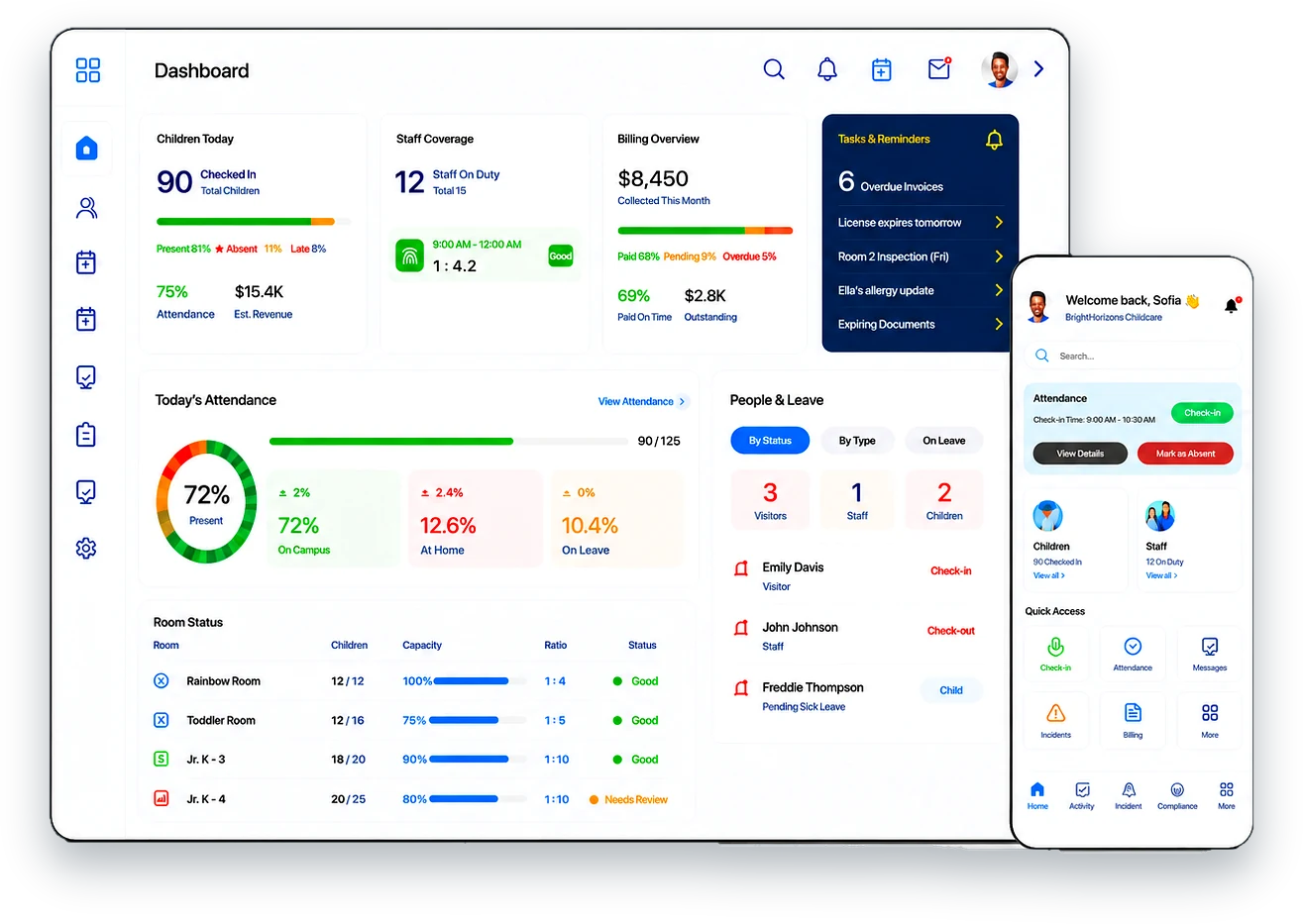
CubCare connects owners, educators, families, and multiple location teams so your centre stays organized, informed, and easier to manage every day.
Explore platform features
The connected hub for your centre.
See attendance, ratios, billing, staffing, and reports from one clear dashboard.
ExploreLog daily activities, meals, naps, attendance, and classroom updates with less paperwork.
ExploreStay connected with photos, messages, reports, reminders, and simple online payments.
ExploreManage every centre, compare performance, and keep standards consistent across locations.
ExploreEvery part of your centre's day moves through CubCare, so nothing falls between disconnected tools.
Waitlist to enrolled
Tap to check in
Activities and observations
Photos and messages
Ratios, staff and reports
Right from the platform
CubCare brings the core work of a childcare centre into a single platform that owners, educators and families all share. This is the real product, not a brochure.
Digital sign in and sign out with time stamped records for every child and room.
ExploreLive staff to child counts so rooms stay within the ratios your licence expects.
ExploreMessages, daily reports, photos and notices that reach every family in one place.
ExploreInvoices, subsidies, deposits and online payments tracked without the spreadsheet.
ExploreMeals, naps, diapers, activities and notes captured by educators in seconds.
ExplorePlan menus and keep full records of the meals and snacks served to children each day.
ExploreBuild shifts, see coverage and track hours across every room and location.
ExploreStaff records, documents, certifications and pay preparation in one workspace.
ExploreRecords and exports ready for licensing reviews and centre reporting.
ExploreCapture incidents, route them for teacher, manager and parent sign off, and print for licensing.
ExploreInquiries, tours, waitlists and family onboarding from first contact to first day.
ExploreOne connected view across every site for owners and multi location operators.
ExploreSwitch between the core areas of CubCare to see how each part works, from the room to billing, staffing, reporting and security.
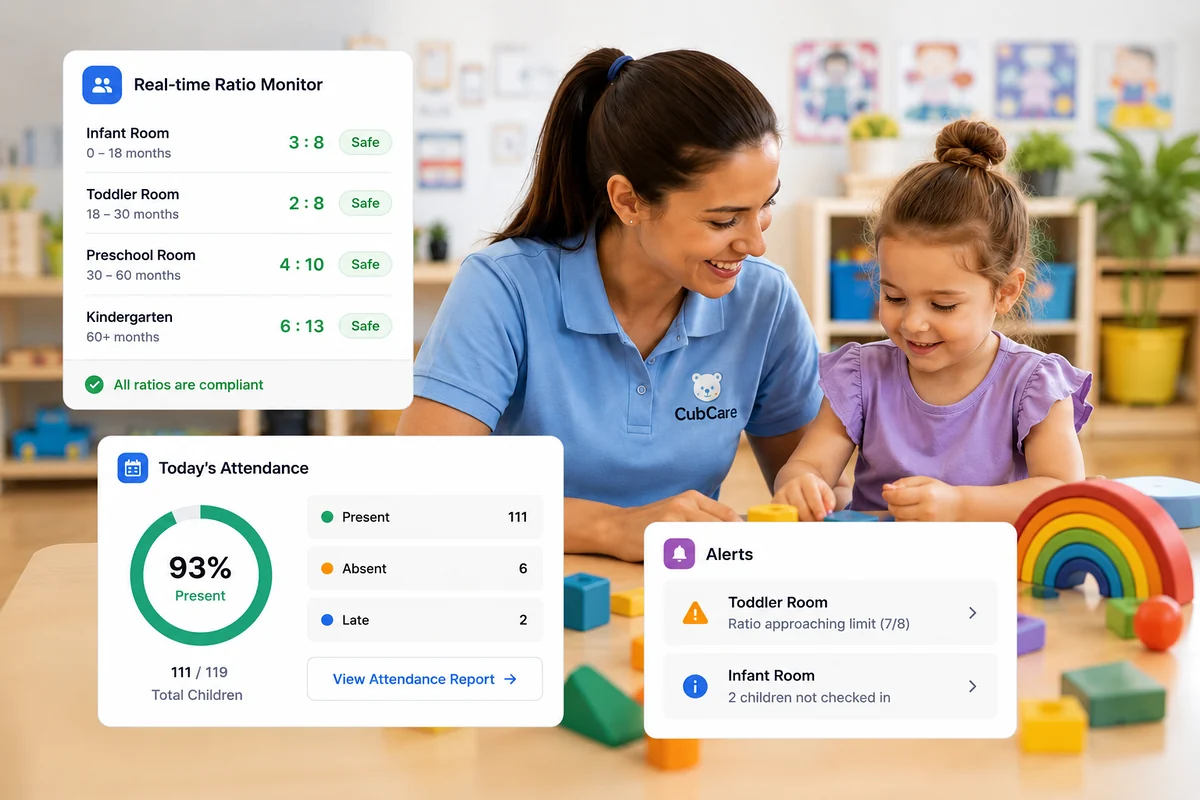
Educators check children in and out by room and CubCare keeps a time stamped record for every child. Each room shows a live ratio so your team can see at a glance when another educator is needed.
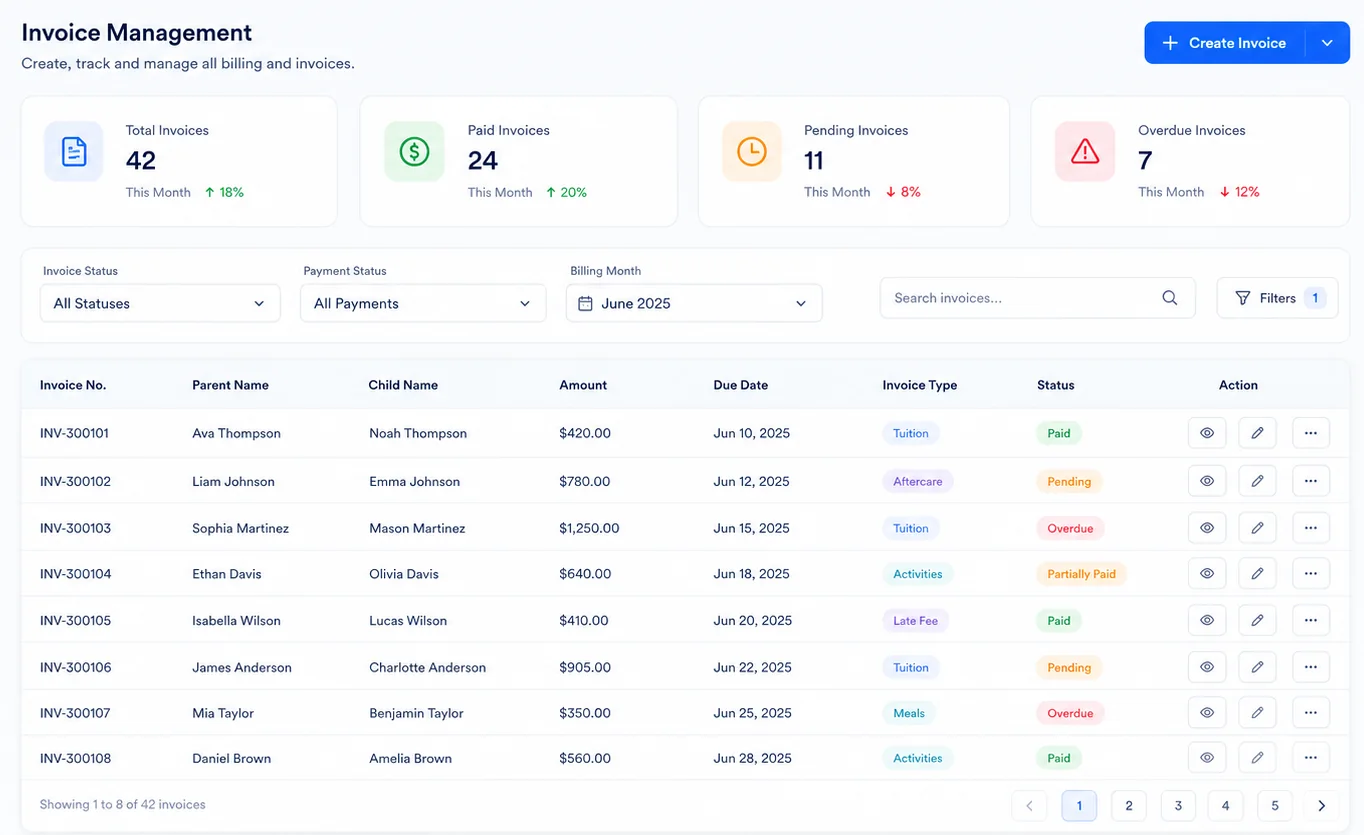
Send invoices, track subsidies and deposits, and collect payments online. CubCare shows you outstanding balances and what is due so billing stops living in a spreadsheet.
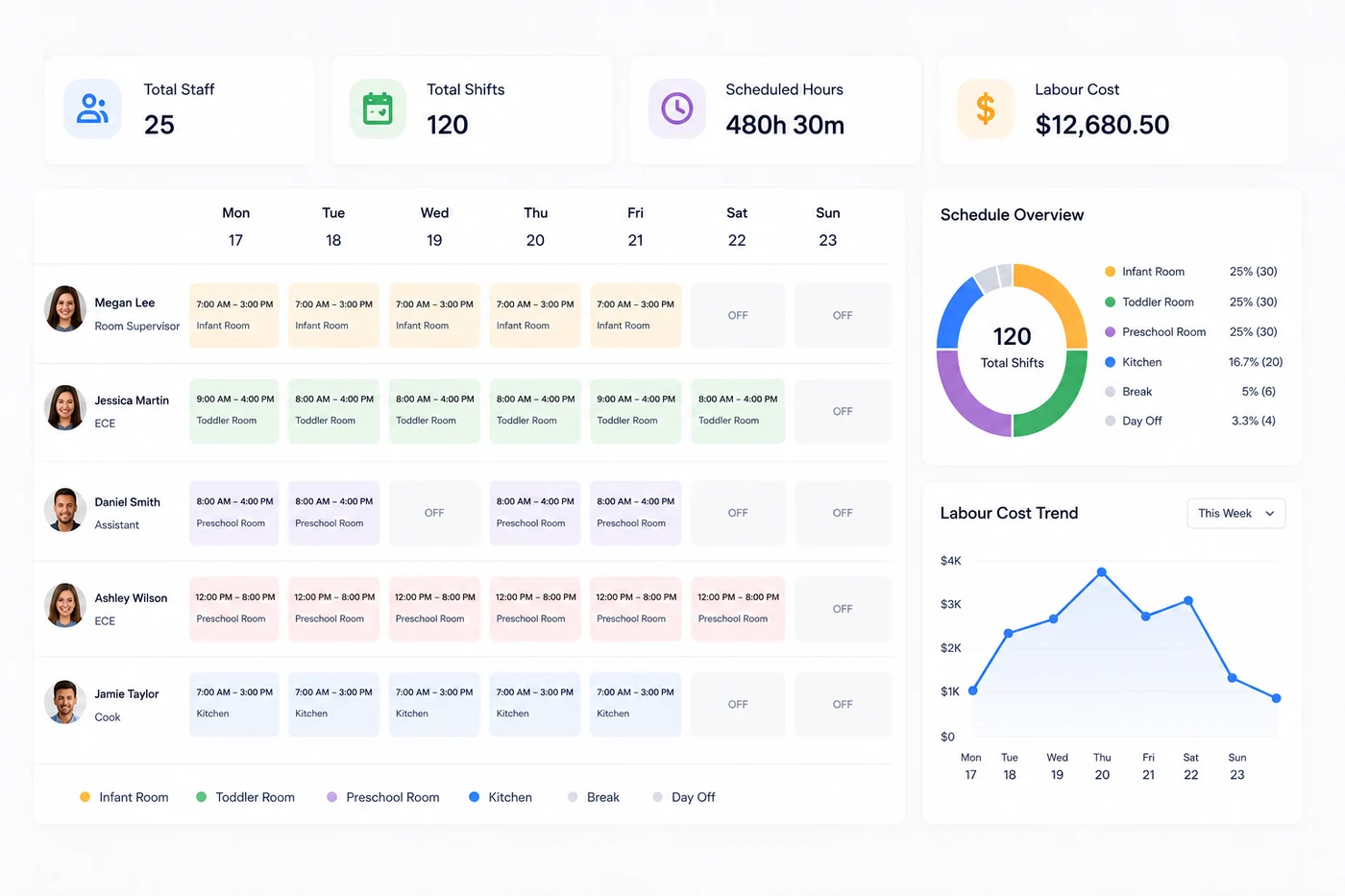
Build staff schedules by room and location, track hours, and keep staff records, documents and certifications together so your people side runs as smoothly as your rooms.
Pull the attendance, billing and program records your licensing reviews and board reports depend on. Exports are organised and ready instead of rebuilt by hand each time.
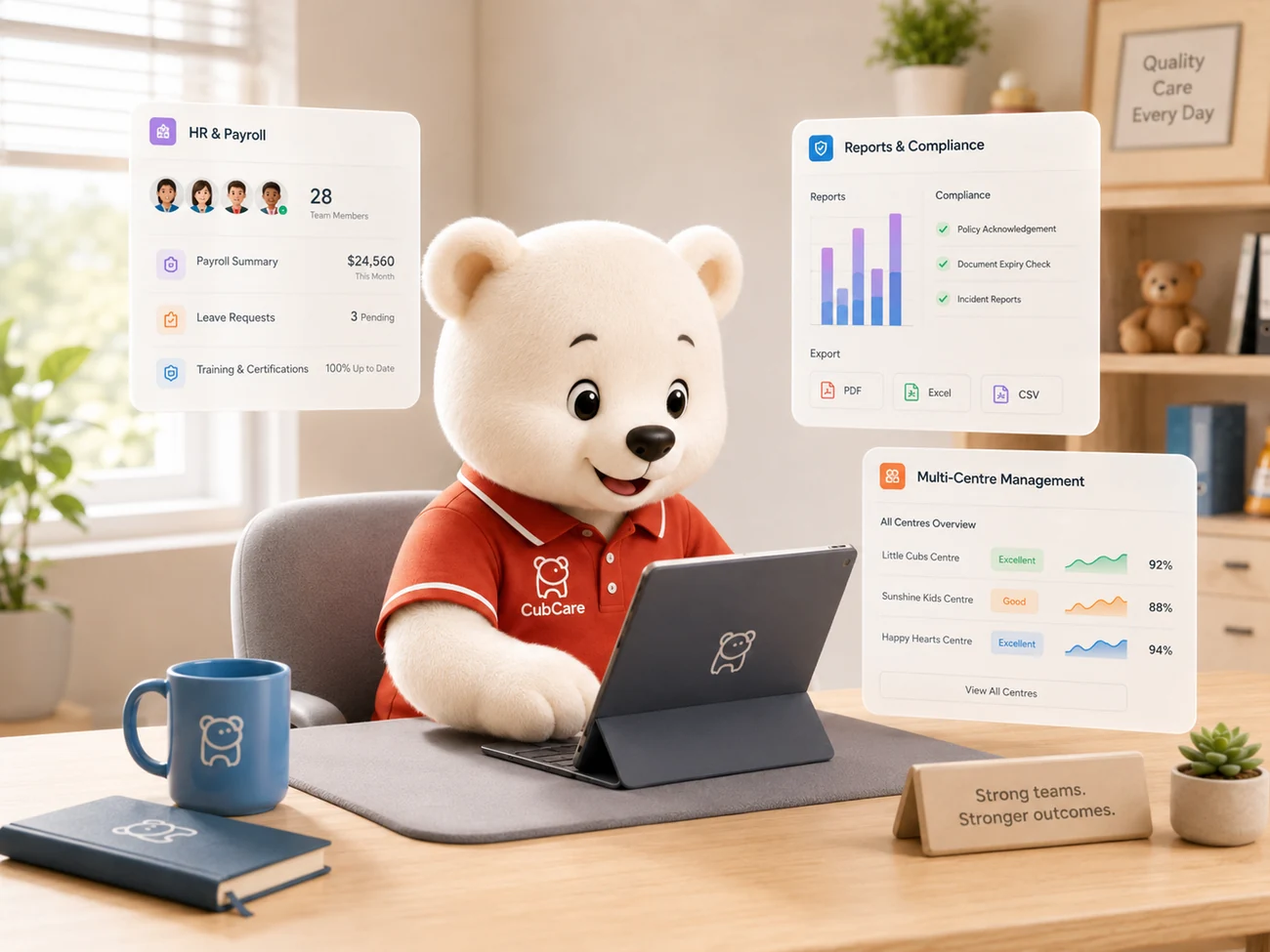
Most childcare platforms stop at attendance and make you add a separate payroll tool. CubCare keeps payroll and HR right where you manage staff, with the flexibility to upload or generate your own paystubs.
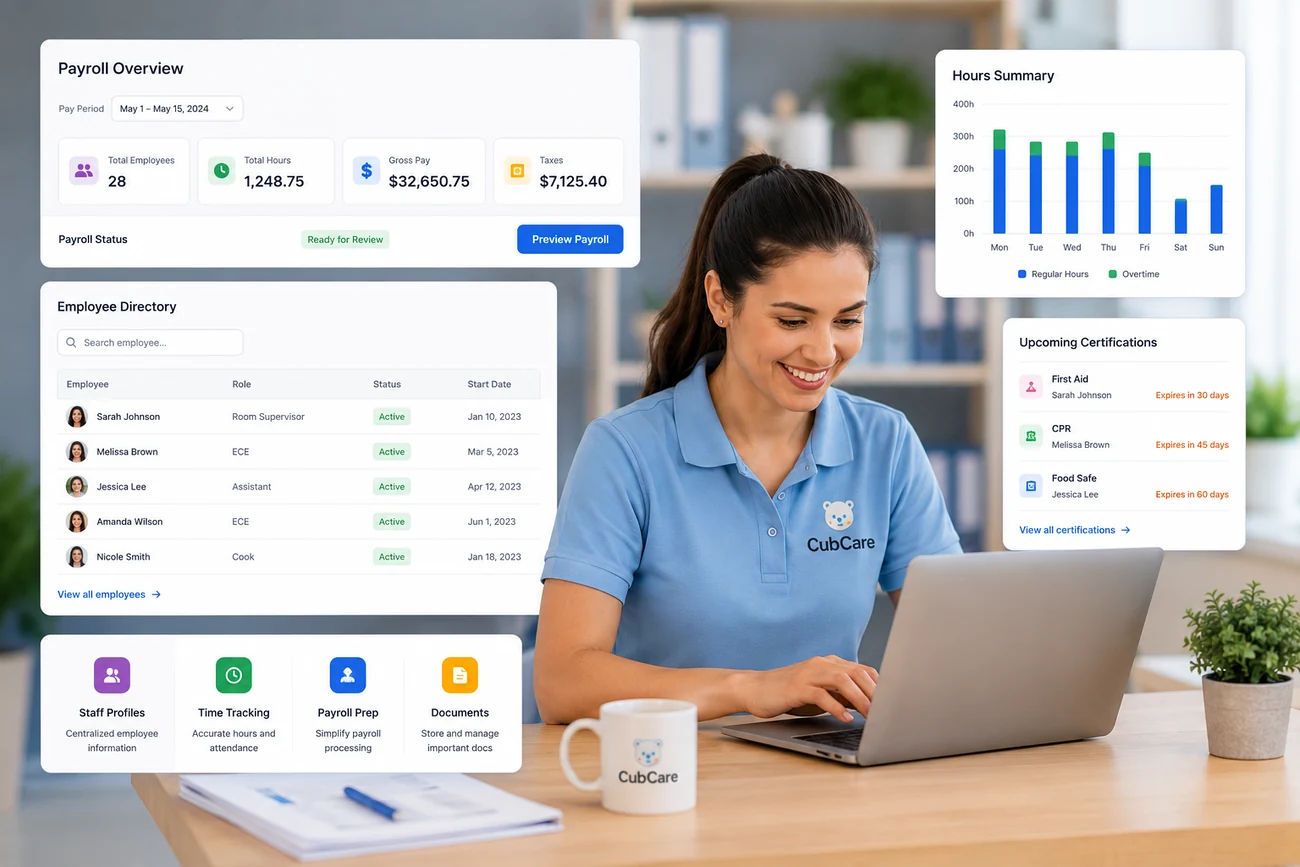
CubCare is built so the right people see the right information. Access is controlled by your centre, with role based permissions and secure login at the core.
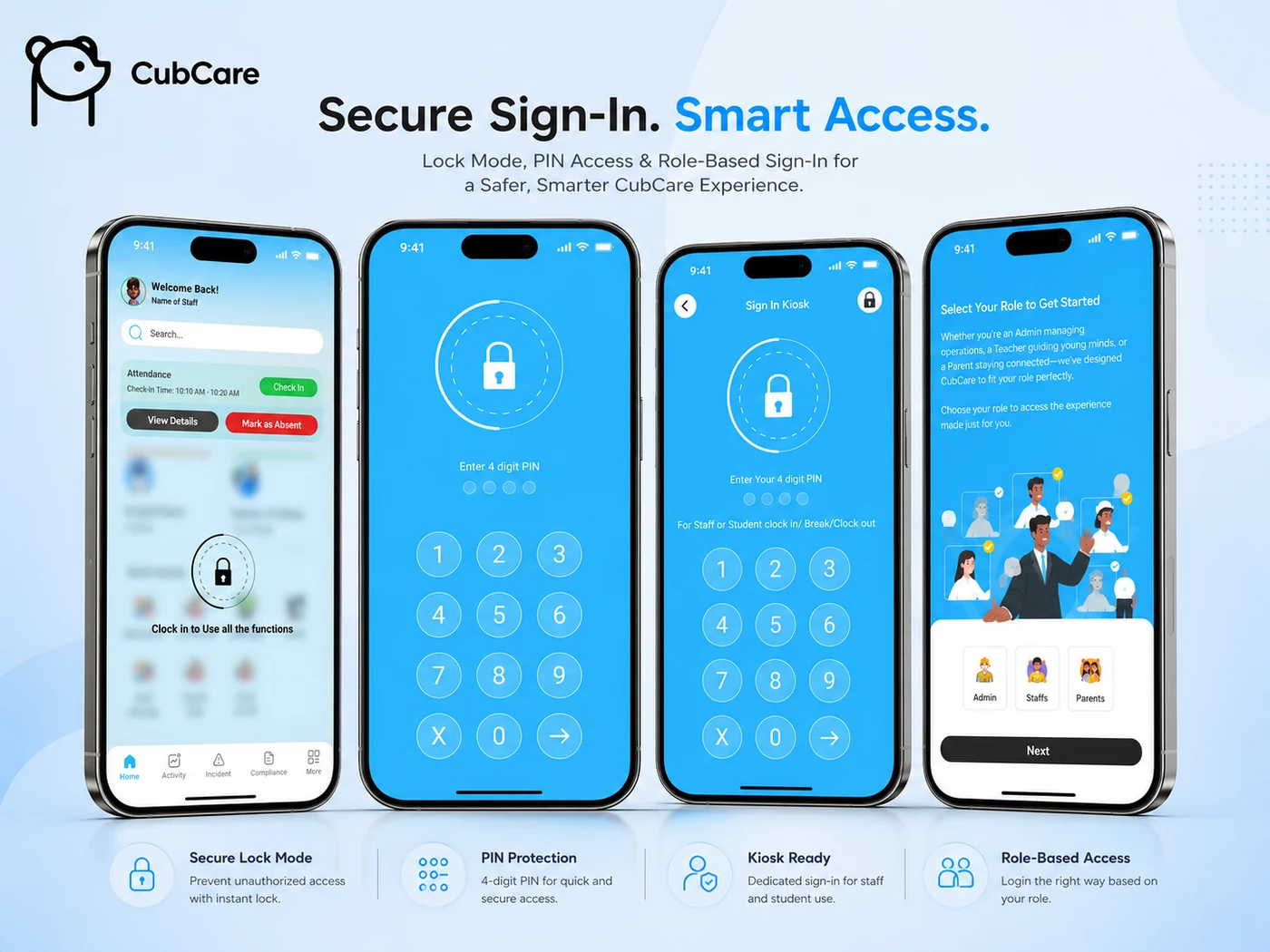
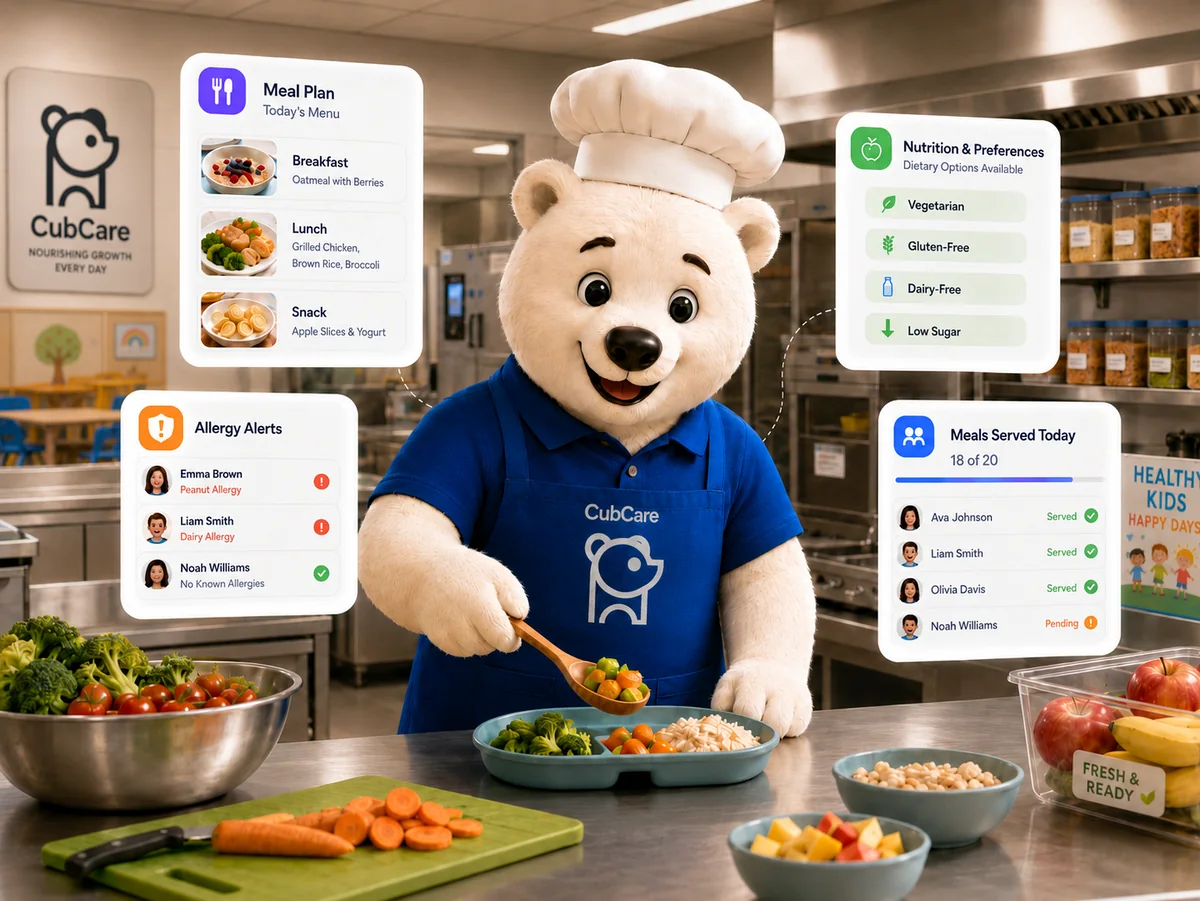
Build the week's menu once and it reaches everyone who needs it. Families follow along in the app, your board copy prints in a click, and allergies stay in front of whoever is serving.
Use our childcare calculators to estimate savings, check ratios and understand your revenue potential. Each one is an estimate to help you plan.
Estimate the time and cost your centre could save by moving daily admin into one platform.
Check staff to child guidance by province and territory with our Canadian ratio reference.
See your revenue potential based on classrooms, capacity and target occupancy.
Measure the value of unfilled seats and what it takes to close the gap.
Estimate the hidden admin and friction cost in your current billing process.
Estimate what scheduling time and overtime are costing your centre each year.
Owners, directors and administrators on what changed after moving to CubCare.
Book a demo to walk through the platform with our team, or get a quote built around your centre size and needs.
Check children in and out by room, keep a time stamped record for every child, and watch each room's staff to child ratio update in real time. CubCare gives your team a clear, current picture of who is present all day.
Educators sign each child in and out from their room on web or mobile, and every entry is time stamped automatically. You get an accurate, searchable attendance record for every child and room, with daily, weekly and monthly views, instead of paper sheets that are easy to lose and hard to audit.
Each room shows its current staff to child ratio in real time as children arrive, nap, move between rooms and head home. CubCare flags the moment a room needs another educator, so your team keeps every room within the ratios your licence expects, even when the day shifts.
Attendance is not a silo. It feeds your ratio view, your staffing and your reports, so a single check in keeps your live ratios, your daily records and your licensing exports up to date at the same time.
Paper attendance sheets are easy to lose and hard to audit
Ratios shift through the day as children and staff move
Counting heads by hand takes time and invites mistakes
Educators sign children in and out room by room, each entry time stamped for an accurate record.
See attendance at any level and pull attendance reports whenever you need them.
Every room shows its staff to child ratio and flags when another educator is needed.
A full record of kiosk sign ins keeps attendance and access accountable.
Accurate attendance for every child, ready for review.
See each room's ratio update as children and staff move.
Check in flows that keep drop off calm and quick.
Attendance exports built for licensing and board reviews.
Add each room and its age group once.
Educators sign children in and out as the day goes.
Each room shows its ratio and flags when staffing needs attention.
Book a demo to walk through the platform, or get a quote built around your centre.
Send invoices, track subsidies and deposits, and collect payments online. CubCare keeps outstanding balances and due dates in view so billing stops living in a spreadsheet and stops eating your week.
Create and send invoices to families directly inside the platform, with subsidies, deposits and balances tracked on every account. There is no separate billing tool to maintain and nothing to export and re import between systems.
Families pay online, and CubCare keeps outstanding balances and due dates in view while sending reminders for upcoming and late amounts. Billing stops living in a spreadsheet and stops eating hours every week.
Beyond family billing, CubCare supports your team's pay. Generate paystubs in the app or upload paystubs prepared by your accountant, kept alongside each staff record, so your finances live in one connected workspace.
Manual billing follow up takes hours every week
Subsidies, deposits and late amounts are hard to track
Families pay in different ways that are tricky to reconcile
Create and send invoices to parents directly from CubCare, no separate tool to generate them.
Track funded portions, deposits and family balances so every account stays clear.
Families pay online while you see collected and outstanding amounts at a glance.
Generate paystubs in the app or upload paystubs from your accountant, kept with each staff record.
Make it simple for families to pay on time.
Keep funded and family portions clear.
Upcoming and overdue notices sent for you.
Always know what is collected and what is due.
Add your fees, subsidies and schedules.
Issue invoices and let families pay online.
Follow balances and export billing reports.
Book a demo to walk through the platform, or get a quote built around your centre.
Share daily reports, photos, messages and notices from the same place your team already works. Families get one simple app instead of a stream of texts, emails and paper notes home.
Parents get a single, friendly app instead of a stream of texts, emails and notes home. They follow their own child's day, including daily reports, photos, videos, activities, curriculum and meals, and they message their child's teachers directly.
Educators capture meals, naps, diapers, learning moments and photos from the room as the day happens, and families see them right away. Two way messaging and scheduled newsletters keep everyone informed without anyone retyping the same update.
Activities and updates reach only that child's parents, never other families. Confidentiality is built in, so an activity logged for one child is never shared with another family by mistake.
Important messages get lost across texts and emails
Daily updates take time to write up by hand
Parents feel out of the loop about their child's day
Message between admins, staff and parents, with a full record of every conversation.
Share meals, naps, learning, photos and videos from the room as the day happens.
Write, schedule and send newsletters, and share centre events with families.
Activities and updates reach only that child's parents, never other families.
Talk with families and the whole centre in one place.
Meals, naps and activities shared as they happen.
Brighten a parent's day with a quick photo.
See that important notices were received.
Parents join the app with a simple invite.
Educators post reports, photos and messages.
Families reply, confirm and stay in the loop.
Book a demo to walk through the platform, or get a quote built around your centre.
Build staff schedules by room and location, see coverage at a glance, and track hours for payroll. CubCare takes the guesswork out of who is working where, and when.
Create staff schedules by room and location and spot coverage gaps before they become a last minute scramble. Staff attendance, shifts and time stamps keep hours accurate and make payroll preparation simple.
Keep staff profiles, roles, documents, certifications and leave requests together. Staff submit leave requests in the app, and you manage them alongside scheduling and HR rather than across separate tools.
Teaching staff can only open children, rooms, curriculums and attendance when they are signed in for an assigned shift, using a personal PIN at the kiosk. Signed out, they see only their own profile, shift and leave requests, and every sign in is recorded.
Scheduling lives in spreadsheets and group chats
Coverage gaps appear at the worst moments
Hours are hard to total for payroll
Build schedules room by room and see coverage gaps before they cause stress.
Track staff attendance, shifts and time stamps for accurate hours and payroll prep.
Assign roles, keep staff profiles, documents and certifications together.
Receive and manage staff leave requests directly in the app.
Teaching staff reach children, rooms and attendance only when signed in for an assigned shift with a personal PIN.
Plan the week by room and location.
Spot open shifts before they cause stress.
Worked hours collected for payroll.
Everyone knows where they are needed.
Set shifts for each room and location.
See gaps and fill them early.
Use tracked hours to prepare pay.
Book a demo to walk through the platform, or get a quote built around your centre.
Keep staff records, documents, certifications and worked hours together so your people side runs as smoothly as your rooms. CubCare helps you prepare payroll with confidence.
Every pay period follows the same path, so hours are agreed before they reach payroll and nothing has to be rebuilt from memory at the end of the month.
Educators start and end their shift in the app or at the kiosk, so worked time is captured as it happens.
Shifts, overtime, leave and any changes collect against each staff profile through the pay period.
Anything that needs a second look is flagged. A manager fixes it and approves the hours before payroll is prepared.
Approved hours become a clean summary per person. Generate paystubs in CubCare, or export the figures for your provider.
Whether generated here or sent back by your accountant, each paystub is filed against the right staff member.
CubCare prepares the numbers and keeps the paperwork. Filing and remittances stay with your accountant or payroll provider.
Generate paystubs directly in CubCare or upload paystubs prepared by your accountant. Either way they are stored with the right staff record, so pay history stays organised and easy to find.
Profiles, roles, documents, certifications and worked hours live in one place. Time stamps and tracked hours make payroll preparation straightforward and reduce manual reconciling at the end of each period.
Start from preset managerial, teaching and HR roles, then adjust what each role can access. You decide who can see payroll and finances, and you can change it at any time.
First aid, CPR and qualification renewals are tracked against each profile with reminders before they lapse, so a licensing visit never catches you with an expired certificate.
Staff request time off in the same app they clock into. Managers approve or decline, and approved leave shows up against the schedule and the pay period automatically.
Approved hours export cleanly per pay period, so whoever runs your payroll gets consistent figures instead of a spreadsheet rebuilt by hand each month.
Staff documents are scattered across folders
Certifications expire without warning
Payroll prep means rebuilding hours by hand
Nobody is sure which paystub was already sent
Leave requests live in texts and sticky notes
Everyone can see pay information they should not
Generate paystubs in the app or upload paystubs sent by your accountant.
Keep profiles, roles, documents and certifications in one organised place.
Time stamps and tracked hours make payroll preparation straightforward.
Handle staff leave requests alongside the rest of your people side.
Get told before first aid, CPR or qualifications lapse, not after.
Contracts, policies and signed forms filed against each staff member.
Bring a new educator on with the same steps and paperwork every time.
Send approved hours and pay figures to your accountant in a consistent format.
Records, roles and contacts together.
Contracts and forms stored securely.
Keep qualifications current and visible.
Worked time ready for payroll.
Requests, approvals and balances in one place.
Only the right people see pay information.
A repeatable start for every new hire.
Figures your accountant can work from.
CubCare ships with preset roles that match how most centres are staffed. Adjust any of them, or build your own, so pay and personal information stay with the people who need them.
| Can access | Owner Director | Manager | HR | Educator |
|---|---|---|---|---|
| Own profile and paystubs | Yes | Yes | Yes | Yes |
| Request leave | Yes | Yes | Yes | Yes |
| Approve hours and leave | Yes | Yes | Optional | No |
| View all staff records | Yes | Optional | Yes | No |
| Manage documents and certifications | Yes | Optional | Yes | No |
| Prepare payroll and export | Yes | No | Optional | No |
| See centre finances | Yes | No | No | No |
Optional means it is off by default and you can switch it on for that role. Every permission can be changed at any time.
Create staff profiles, assign roles and set what each person can see.
Upload contracts, policies and certifications so they sit with the right person.
Staff clock in and out; shifts, overtime and leave build up through the period.
Approve the hours, then generate paystubs or export the figures to your provider.
Book a demo to walk through the platform, or get a quote built around your centre.
Pull the attendance, billing and program records your licensing reviews and board reports depend on. CubCare keeps records organised so exports are ready instead of rebuilt by hand each time.
Pull attendance summaries, billing and subsidy reports, ratio and staffing logs and program records, all reading from one connected source. Exports stay organised through the day instead of being rebuilt by hand the week before a review.
Create incident and behaviour reports in the app and sign them off with attending staff, managing staff and parent signatures. Completed reports can be printed to send to your governing licensing department.
Because attendance, billing and program data all live together, your licensing and board reports come from a single source, which reduces the risk of mismatched numbers across separate tools.
Reports are pieced together from many sources
Licensing reviews demand records fast
Board reporting eats director time
Pull the attendance, billing and program records your reviews depend on.
Create incident and behaviour reports in the app and sign off with attending staff, managing staff and parent signatures.
Print completed incident reports to send to your governing licensing department.
Reporting reads from one source, so exports are organised instead of rebuilt by hand.
Records pulled from connected data.
PDF and CSV exports on demand.
Records organised for reviews.
Stop rebuilding the same reports.
Daily work fills your records automatically.
Pick the records you need.
Download in the format you need.
Book a demo to walk through the platform, or get a quote built around your centre.
Teachers record an incident the moment it happens, and CubCare routes it through manager review, parent sign off and final approval. Every report is signed, time stamped and ready to print for your licensing body, with the administrator able to see it on the dashboard at any time.
Every incident takes the same simple path, so nothing slips through and the final report is complete and signed by everyone who needs to sign it.
As soon as something happens, the teacher notes what took place, where and when, and what they did to help.
A manager reads it over to be sure it is complete. If anything is unclear, they send it back to the teacher to add more.
Once everything looks right, the manager signs off to approve the report.
The child's parent reads the report and signs to confirm they have seen it, then it comes back to the manager.
The finished report is saved where admins can find it any time, and prints as a tidy PDF you can send to licensing.
If a report is missing anything, it simply goes back a step. Only complete, fully signed reports ever reach parents or your licensing office.
The attending teacher creates the report right after an incident, filling in the child, date and time, location, a description of what happened, who was involved and the action taken. Required fields mean nothing important is left blank, and the record is time stamped so it reflects when the incident actually occurred.
The report moves from the teacher to the manager for review. If anything is missing or unclear, the manager sends it back to the teacher to correct, and once it is complete the manager signs to approve. It then goes to the parent, who reviews and signs to acknowledge the incident, and the signed record returns to the manager. Every signature is captured and dated.
Administrators can open any incident from the dashboard at any time and see exactly where it is in the process. Completed reports export as a clean, signed PDF you can print and send to the licensing body for your jurisdiction, so your centre stays compliant without rebuilding paperwork by hand.
Paper incident forms get lost or filled in late
Chasing teacher, manager and parent signatures takes days
Licensing needs a clean, complete record fast
The attending teacher records the child, time, location, what happened and the action taken, with every required field in place.
The report routes to the manager to check. If something is missing it goes back to the teacher, then returns signed and complete.
Once the manager approves, the family reviews and signs to acknowledge the incident, and the record returns to the manager.
Export a clean, signed PDF and send it to your local jurisdiction, with the administrator able to view it any time.
Signed, dated records built for licensing reviews.
Required fields and sign offs are tracked to completion.
Administrators see every incident from the dashboard.
Export a tidy PDF to send to your jurisdiction.
Book a demo to walk through the platform, or get a quote built around your centre.
Capture inquiries, schedule tours, manage your waitlist and onboard families without losing anyone between steps. CubCare keeps your enrollment pipeline visible the whole way through.
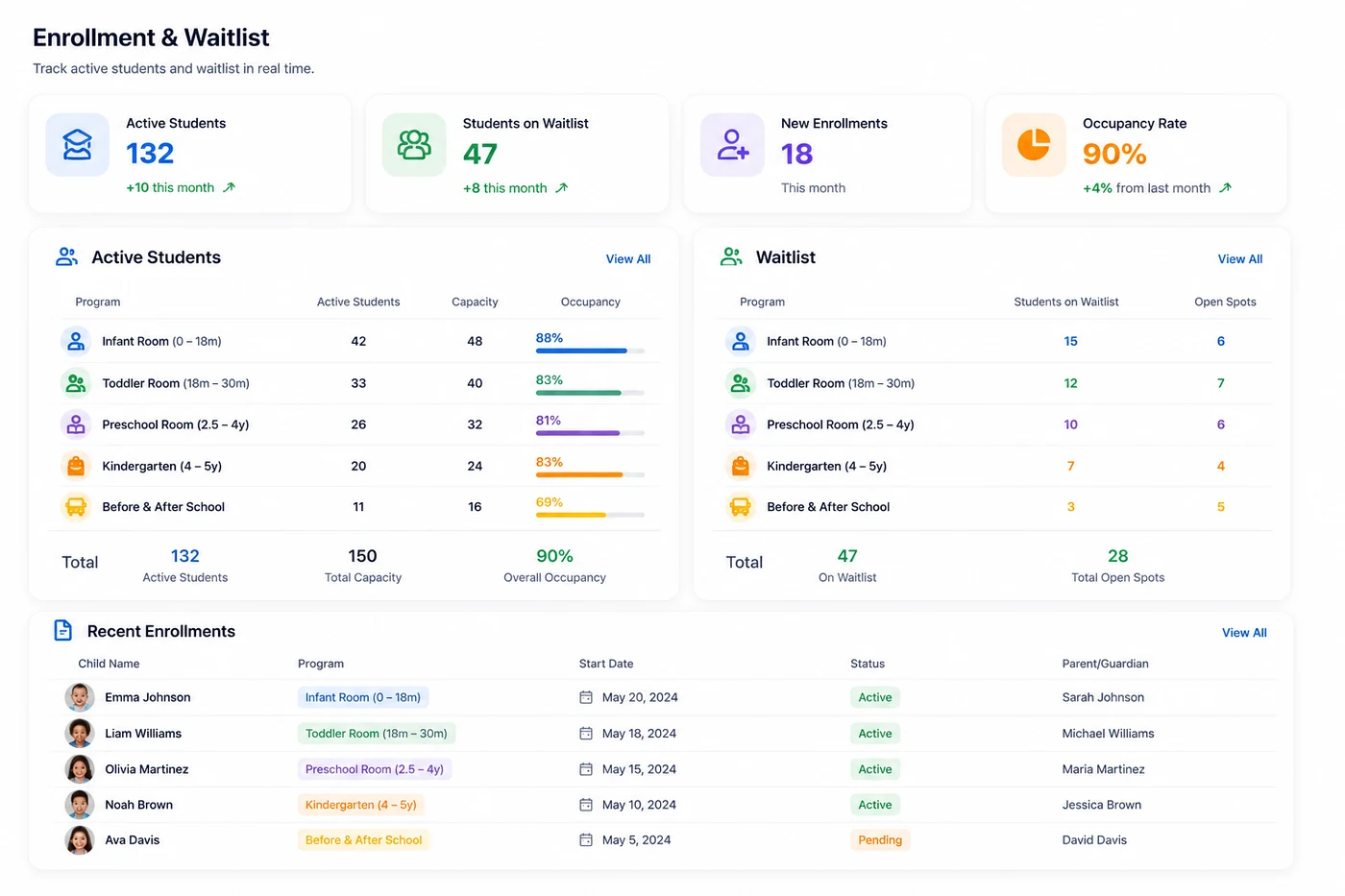
Capture every inquiry, schedule tours and keep your pipeline visible so no family is lost between steps. Your waitlist, offers and starts stay organised in one clear view.
Manage active children, inactive children and your waitlist together, with each child's profile, documents and history kept in order, so onboarding a new family is smooth from the start.
Bring new families across with their records and details ready, so a child's first day is calm for the family and for your team.
Inquiries slip through the cracks
Waitlists are hard to keep current
Onboarding new families is repetitive work
Manage active children, inactive children and your waitlist in one place.
Capture inquiries and schedule tours so no family is lost between steps.
Bring new families on board with their records and details in order.
Keep each child's profile, documents and history together.
Every lead in one place.
Book and track centre tours.
Keep your list current and fair.
Guide families to their first day.
New interest lands in your pipeline.
Schedule tours and send offers.
Welcome enrolled families smoothly.
Book a demo to walk through the platform, or get a quote built around your centre.
Run every site from one account and switch between locations in a single click, with no logging in and out. CubCare keeps each centre's information separate while giving operators one connected view of the whole organization, instantly accessible from one place.
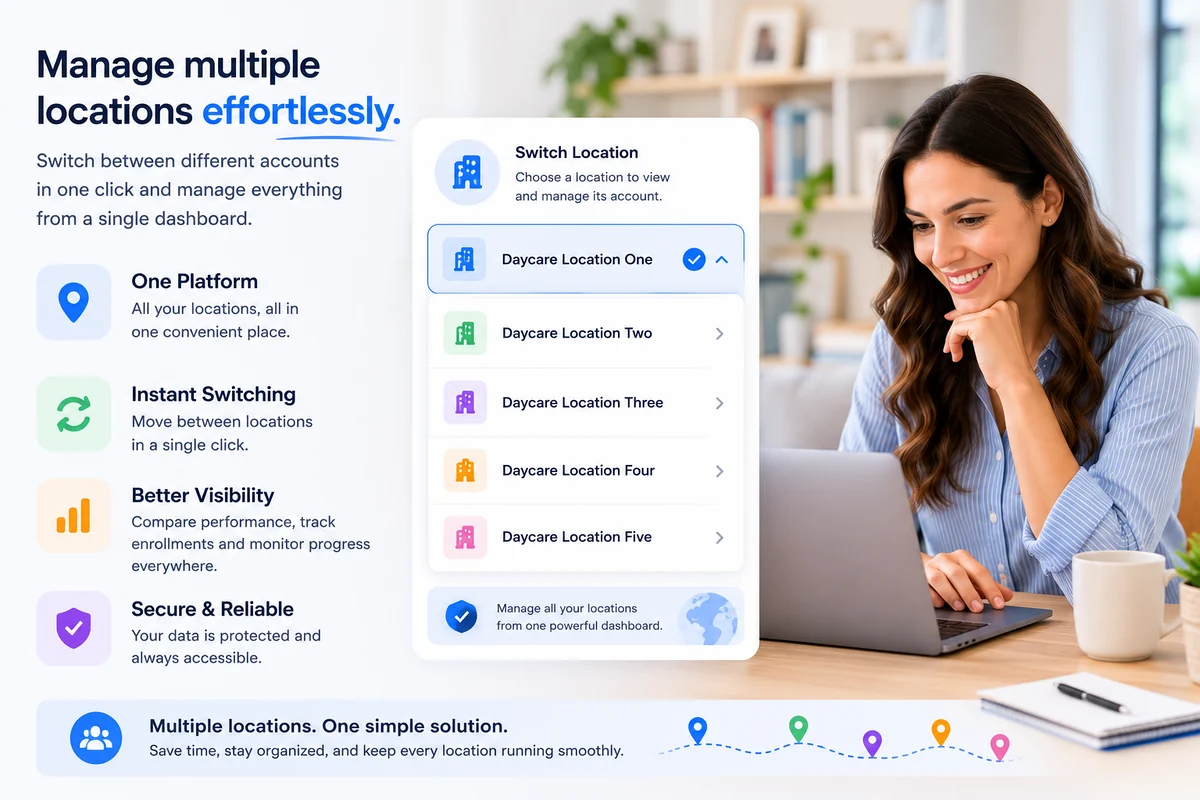
Run every site from one account and move between locations with a single click, with no logging in and out. Each centre's information stays separate while remaining instantly accessible from one place.
See occupancy, revenue and staffing side by side across locations, then drill into any single centre for detail. Shared structure helps every site run to the same standard while keeping local flexibility.
Set roles and permissions across the organization, so the right people see the right information at every location and standards stay consistent as you grow.
Each site runs on its own tools and habits
Comparing locations means chasing spreadsheets
Standards drift from one centre to the next
Switch between locations in a single click, with no logging in and out.
Reach every centre from one account, each location's information kept separate and instantly accessible.
See occupancy, revenue and staffing side by side, then drill into any single centre.
Set roles and standards across the organization while keeping local flexibility.
One organization wide view.
Occupancy, revenue and staffing side by side.
Operator level roles and permissions.
Cross location reports in one place.
Bring each centre into CubCare.
Apply consistent setup across sites.
Compare and act across the organization.
Book a demo to walk through the platform, or get a quote built around your centre.
CubCare gives owners and directors a clear, current picture of attendance, ratios, billing and staffing in one place, so you can lead your centre with confidence instead of chasing information.
Most centres run on a patchwork of paper, spreadsheets and apps that do not connect. For an owner or director, that means chasing information instead of leading. Here is what that looks like by Friday afternoon.
Paper attendance sheets that are easy to lose and hard to audit
Manual billing follow up that eats hours every week
Parent messages missed across texts, emails and notes home
Staff scheduling confusion and last minute coverage gaps
Reports scattered across binders, spreadsheets and inboxes
Ratio tracking stress when rooms shift through the day
Too many disconnected tools that never talk to each other
Payroll and paystubs handled outside the system, by hand
A director dashboard brings attendance, ratios, outstanding balances and staffing together on web and mobile, so you always know where things stand without chasing information across paper, spreadsheets and apps.
Assign roles and turn areas like billing on or off per person. Teaching staff are shift gated and sign in with a personal PIN, and you decide who can use the sign in kiosk, with a full record of every sign in.
Send invoices, run HR and payroll paystubs, pull centre reports and complete incident reports with the right signatures, all from one platform built for owners and directors.
Key numbers are scattered and out of date
Billing follow up steals leadership time
It is hard to see the health of the centre at a glance
One clear morning view of attendance, ratios, staffing and balances, on web and mobile.
Assign roles and turn areas like billing on or off per person, so each role sees only what it should.
Send invoices and run HR and payroll paystubs without leaving the platform.
Pull centre reports and complete incident reports with the right signatures.
Control who can use the sign in kiosk and keep a record of who is authorised.
The centre at a glance each morning.
Know what is collected and outstanding.
See staffing and ratios in real time.
Reports that support real decisions.
Open one clear daily view.
Follow up on billing and staffing.
Use data to guide decisions.
Book a demo to walk through the platform, or get a quote built around your centre.
CubCare is built for the room. Educators check children in, log daily reports, track ratios and message families in seconds, so more of the day goes to the children in front of them.

Once you are signed in for your shift, open today's children, ratios and plans, and log activities, photos, videos, meals and naps as the day happens. Logging the day takes a few taps, not a stack of paper.
Daily reports and messages reach your room's parents from the same place you already work, so you are not retyping the same updates across different apps.
If you are not signed in for an assigned shift, you cannot open children or centre data. You see only your own profile, shift and leave requests, which keeps every child's information protected.
Paperwork pulls educators away from children
Writing daily updates by hand takes time
Switching between tools breaks focus
Open today's children, ratios and plans once you are signed in for your shift.
Log photos, videos, learning moments, meals and naps as the day happens.
Reach your room's parents directly, without retyping the same updates.
If you are not signed in for a shift you cannot open children or centre data, only your own profile, shift and leave requests.
Sign children in and out quickly.
Log the day without the writing.
Reach families in a tap.
Spend the time where it counts.
See today's children and ratio.
Record reports and moments.
Updates reach parents instantly.
Book a demo to walk through the platform, or get a quote built around your centre.
Families use the CubCare parent app to read daily reports, see photos, message the centre and handle payments. Everything about your child's day lives in one friendly place.
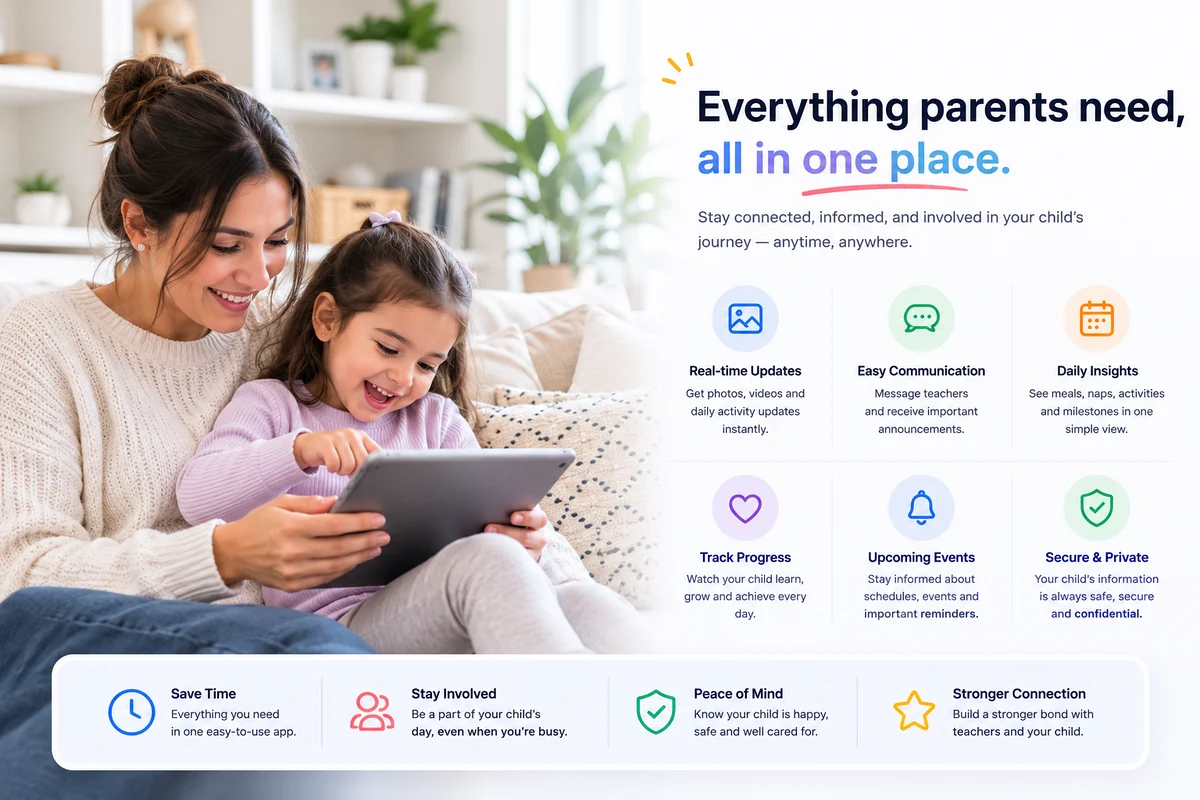
Share daily reports, photos and messages from the same place your team already works. Parents get one app instead of a stream of texts, emails and paper notes.
Follow your own child's activities, curriculum, meals, naps and wellbeing, see photos and videos from the room, and message your child's teachers directly, all from one simple app.
See your invoices and whether they are paid, and pay tuition and fees online. No more wondering what is owed or paying in ways that are hard to track.
The parent app shows only your own child's information, never another family's. Your child's privacy, and every other child's, is protected by design.
Updates arrive across texts, emails and paper
Paying tuition is more complicated than it should be
It is hard to feel connected to the day
Follow your own child's activities, curriculum, meals, naps and wellbeing.
See invoices and whether they are paid, and pay online.
View your child's profile and the centre meal plans.
Message your child's teachers directly from the app.
You only ever see your own child's information, never another family's.
Know how the day went.
See the moments you miss.
Ask questions easily.
Pay tuition online.
The centre invites you to the app.
Read reports and see photos.
Message and pay in one place.
Book a demo to walk through the platform, or get a quote built around your centre.
A guided look at the screens your centre would use every day. Each preview is built from CubCare's interface so you can see how the platform fits the way childcare teams work.
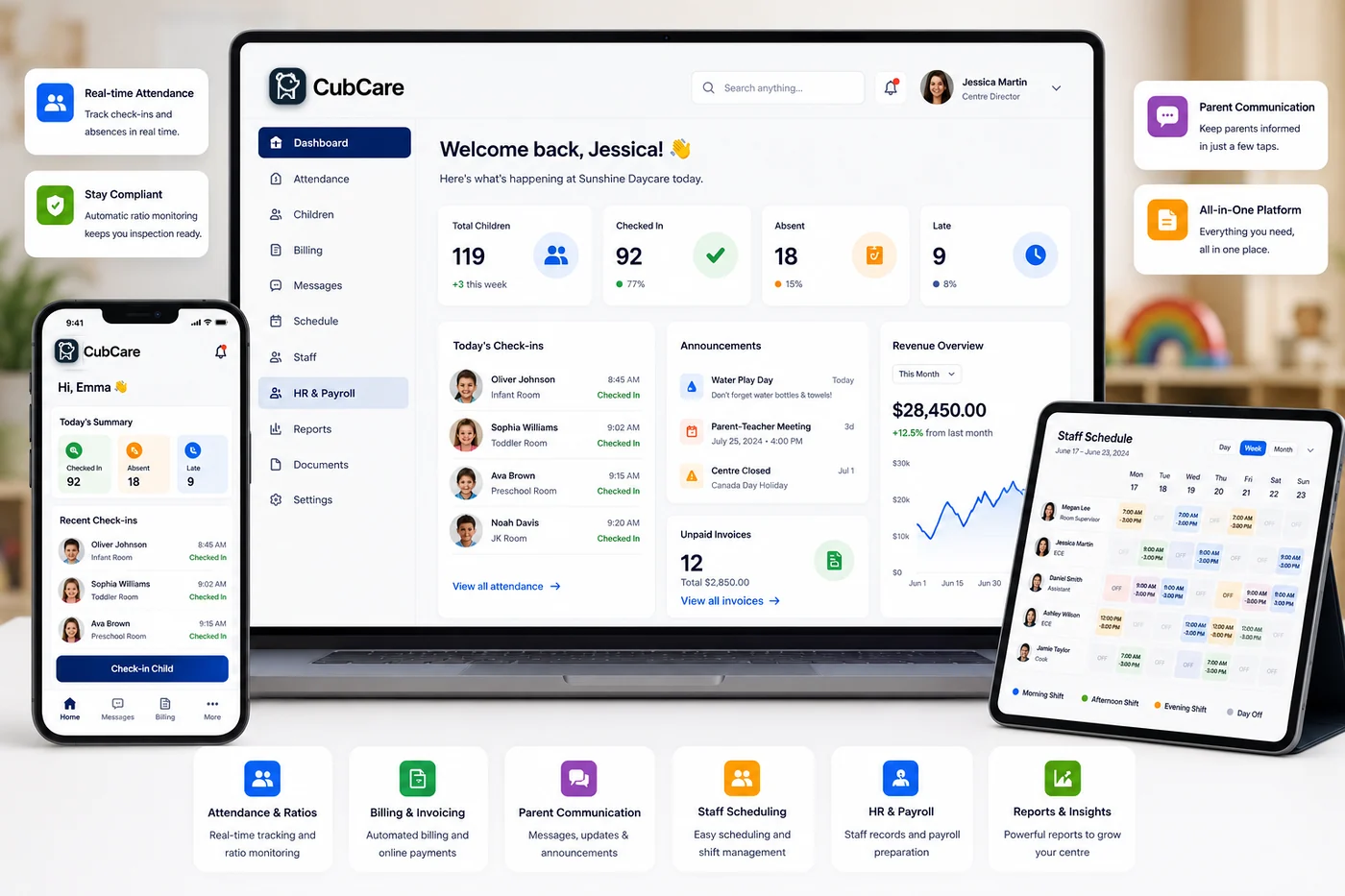
Start every morning with one clear view of attendance, ratios, staffing and outstanding balances across your centre.
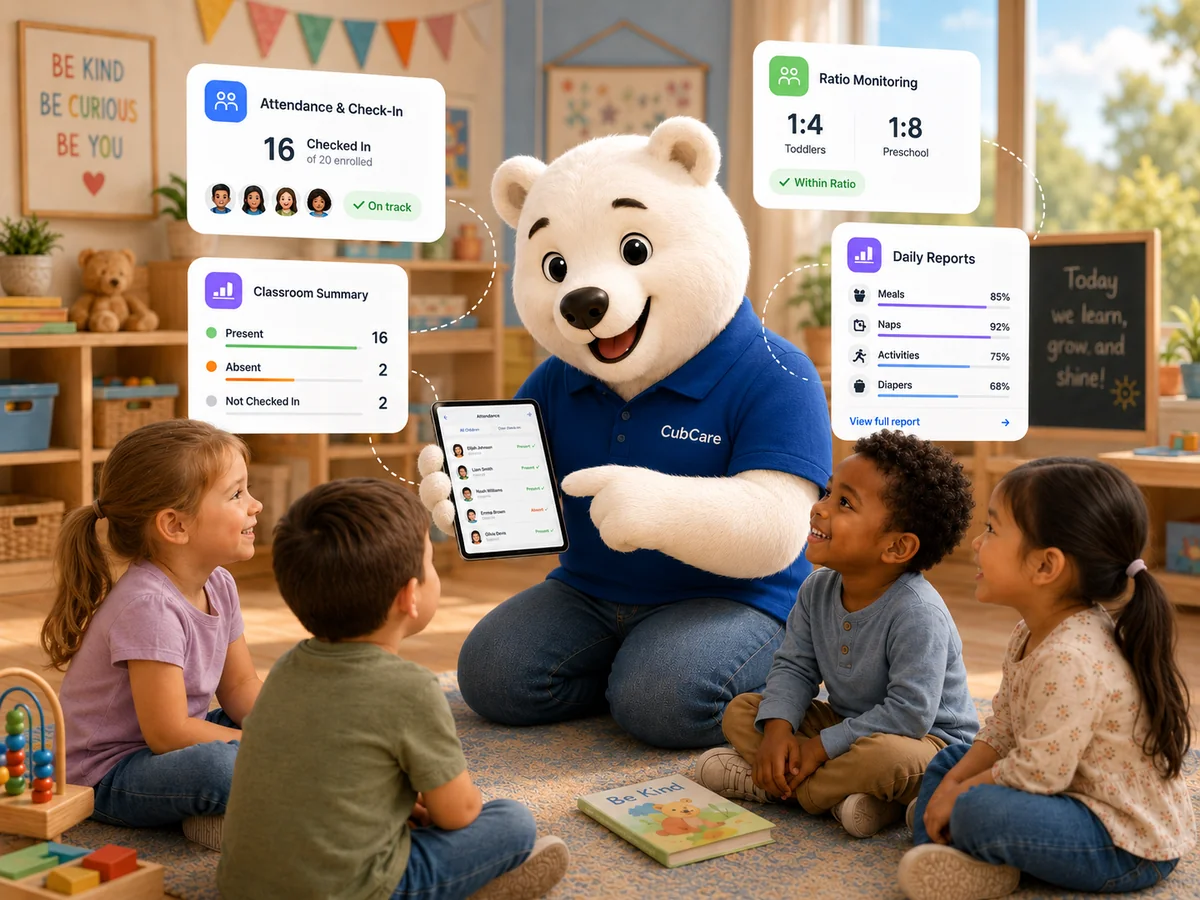
Educators check children in and out by room, and each entry is time stamped for an accurate daily record.
Every room shows its live staff to child ratio and flags when another educator is needed.
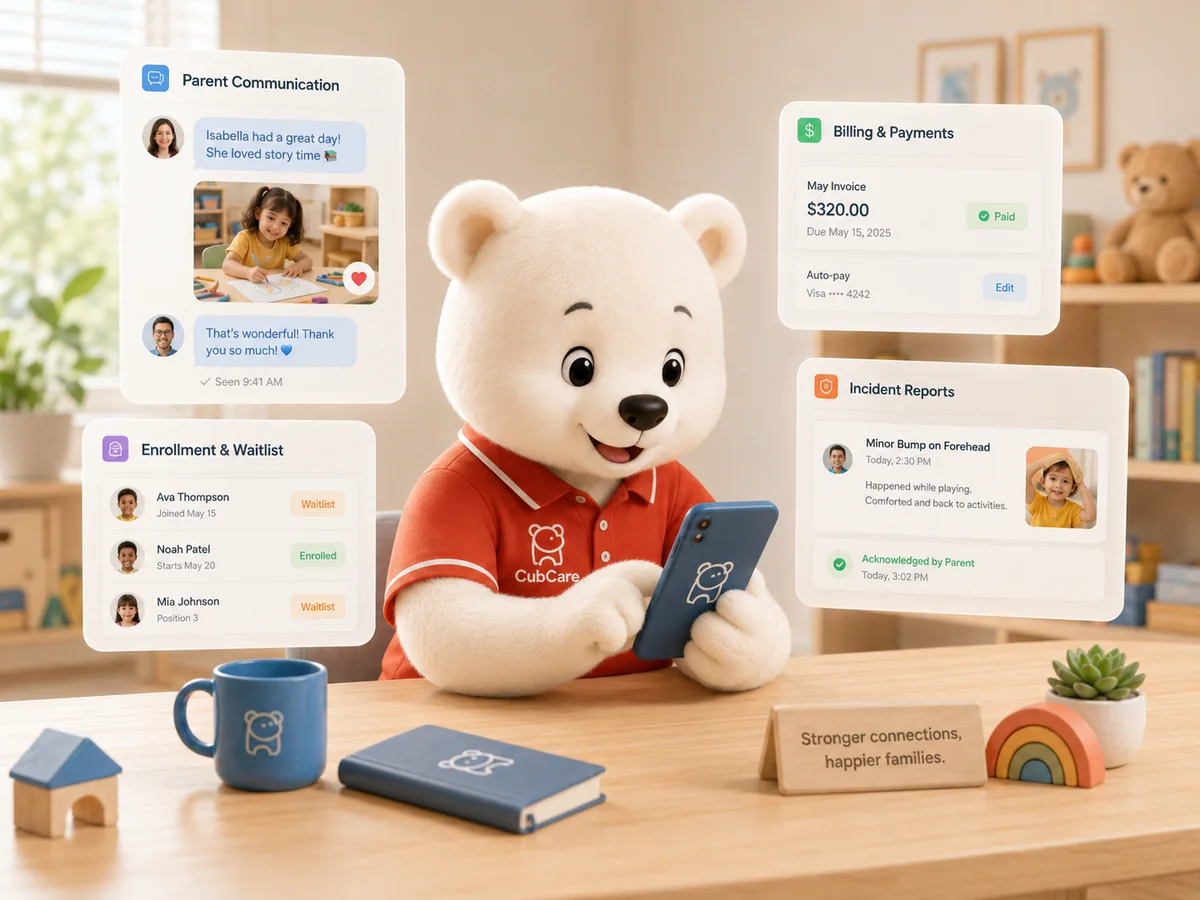
Families read daily reports, see photos, message the centre and pay online, all in one friendly app.
See collected and outstanding amounts, subsidies and due dates, with reminders sent for you.
Build shifts by room and location and see coverage gaps before they cause stress.
Generate the attendance, billing and program records your licensing and board reviews depend on.
Track families from first inquiry through tours, offers and onboarding without losing anyone.
When you send an inquiry, your centre details reach the CubCare team so we can review them and follow up. This preview shows the queue our team uses to manage new centre inquiries.
Book a demo for a full walkthrough with our team.
Estimate the time and cost your centre could save by moving daily admin into one connected platform. Adjust the inputs to match your centre. Every figure is an estimate to help you plan.
Set the weekly hours your team spends on each task, then adjust how much CubCare could reduce it. Defaults are conservative.
See your centre's revenue potential based on classrooms, capacity, enrollment and target occupancy. Use it to understand the value of filling empty seats.
Measure the value of unfilled seats and what it takes to close the gap, from inquiries through tours to starts.
Estimate the hidden admin and friction cost in your current billing process, from staff time to late payments and paper.
Estimate what scheduling time and overtime are costing your centre each year.
Tell us about your centre and we will follow up with next steps for a demo or a quote. Fields marked with an asterisk are required.
We use these details to prepare a quote and tailor your demo.
See CubCare with your own centre in mind. We will walk through the platform and answer your questions.
Share your centre size and needs and we will prepare a quote that fits.
Not ready for a demo? Send your questions and we will point you in the right direction.
CubCare
One connected platform for admins, educators and families. Sign in and pick up right where you left off.
Choose your role, then sign in.
New to CubCare? Book a demo
CubCare exists to bring the daily work of childcare into one connected platform, so the people who run centres and care for children can spend less time on admin and more time where it matters.
We believe childcare teams deserve software as thoughtful as the care they provide. Too many centres still run on a patchwork of paper, spreadsheets and apps that never connect. CubCare brings attendance, billing, communication, scheduling, HR, payroll and reporting together so the whole centre works from one place.
We are focused on Canadian childcare operations, building tools that reflect how daycares, preschools and early learning programs actually run, and growing as a professional platform that owners, educators and families can rely on.
CubCare gives owners and directors one connected place to run attendance, billing, staffing and reporting, so leading a centre feels clear instead of scattered.
Educators get tools built for the room, with quick logging and simple messaging that put more of the day back into the hands of the people caring for children.
Families get one friendly app to stay close to their child's day, with reports, photos, messages and payments in a single place.
Book a demo and explore the platform with our team.
Centre information should stay controlled and protected. CubCare is built so the right people see the right information, with role based access and secure login at the core.
Access is shaped by role, so directors, educators, billing admins and parents each see only what they should.
Accounts are protected by secure login, and access is controlled by your centre.
Centre admins decide who is invited, what they can see and when access should be removed.
Child and family information is handled with care and kept within your centre's controlled workspace.
Centres can request data export and deletion through a clear process.
We describe what CubCare does today and avoid certification claims we have not earned.
Your centre decides who has access and what they can do. Permissions can be adjusted as your team changes, and access can be removed when someone leaves. Device security remains the responsibility of each user and centre.
Whether you are coming from paper, spreadsheets or another software, CubCare helps you bring your centre across in an organised way and gets your team confident before you go live.
We map your rooms, families, staff and billing setup so the move is organised from the start.
Bring child records, family records, staff records and classrooms across from paper, spreadsheets or other software.
Configure fees, subsidies and opening balances so billing is ready on day one.
Educators and admins get comfortable with CubCare before you go live.
Switch on with your team ready and our support close by.
Child and family records, staff records, classrooms and rooms, billing setup and opening balances. We help you check the details so nothing is lost in the move.
Talk to our team about onboarding and we will map the path that fits your centre.
Drop off sets the tone for the whole day. When mornings feel rushed, children pick up on the stress, families leave worried, and educators start the day already behind. A calmer drop off routine is one of the simplest ways to improve the experience for everyone in your childcare centre, and most of it comes down to predictability and a few small habits.
Young children rely on routine to feel safe. A predictable arrival, the same greeting, the same first activity, tells a child that they are in a place they know and trust. When that sequence is consistent, separation becomes easier week after week, even for children who find goodbyes hard.
For families, the first ten minutes are when they form their impression of how the day will go. A warm, organised welcome reassures a parent that their child is in good hands, which matters just as much as anything that happens later in the day.
Decide on a simple arrival sequence and use it every day. A common one is greet the child by name, help them store their belongings, support a quick goodbye with their family, then guide them into a calm opening activity such as quiet play or a book corner.
Avoid starting the morning with high energy group activities. Children arrive at different times and in different moods, so an open ended, low pressure activity lets each child settle at their own pace.
Long, drawn out goodbyes usually make separation harder, not easier. Encourage families to keep their goodbye warm but brief, and to leave once they have said it. Educators can help by stepping in to engage the child the moment the family leaves.
A consistent goodbye ritual, a wave at the window or a special handshake, gives the child something to expect and hold on to.
Mornings get tense when educators are juggling paper sign in sheets, allergy notes and messages while also trying to greet children. Moving check in, attendance and family messages into one place frees your team to focus on the children in front of them.
With digital check in, arrival is a quick tap, attendance is time stamped automatically, and any notes a parent leaves are visible to the room straight away, so nothing important gets lost in the rush.
Book a short demo and we will walk through the platform with your centre in mind.
A clear look at how staff to child ratios work, why they vary by province, and how to stay within them.
CommunicationPractical ways to keep parents informed and reassured without adding to anyone's day.
Staff to child ratios are one of the most important rules a licensed childcare centre has to follow, and one of the most confusing. They change with the age of the children, they differ from province to province, and they shift through the day as children and educators move between rooms. This guide explains how ratios work in plain language so your team can stay confident and compliant.
A staff to child ratio sets the maximum number of children one educator can be responsible for. A ratio of 1 to 8, for example, means one qualified educator for every eight children. If a room has seventeen children at that ratio, it needs three educators, because two could only cover sixteen.
Ratios almost always come with a maximum group size as well. A group might be allowed one educator per eight children but still capped at a total group size, which limits how many children can be cared for together in one space regardless of how many staff are present.
Infants need far more hands on care than preschoolers, so infant ratios are the tightest, often around one educator for every three or four children. As children grow more independent, the ratios loosen, reaching one educator for a larger group of school age children.
This is why centres group children by age. Each age group has its own ratio and its own maximum group size, and mixing ages changes which rule applies.
Childcare is regulated provincially and territorially, so the exact numbers, age bands and group sizes are set by each jurisdiction. Ontario, British Columbia, Alberta and Quebec all use slightly different age categories and ratios, which is why a centre that expands across provinces cannot assume the same staffing plan will work everywhere.
Mixed age and multi age groups, common in smaller and in home settings, usually follow the ratio of the youngest child present, with limits on how many infants and toddlers can be in one group.
The hardest part of ratios is not knowing the numbers, it is maintaining them as the day moves. Children arrive and leave, educators take breaks, and rooms combine at the start and end of the day. A room that is compliant at ten in the morning can slip out of ratio by mid afternoon without anyone noticing.
This is where a live view of each room helps. When your team can see the current ratio for every room at a glance and get a clear signal when another educator is needed, staying compliant becomes part of the daily flow rather than a calculation someone has to remember to do.
Book a short demo and we will walk through the platform with your centre in mind.
Billing is one of the biggest hidden costs in running a childcare centre. Not the fees themselves, but the hours your team spends creating invoices, chasing late payments, reconciling subsidies and answering questions about balances. For many centres, billing quietly eats a full day every week. Here is where that time goes, and how to get most of it back.
Most billing time is not spent on the first invoice, it is spent on everything after. Following up on late payments, correcting amounts, applying subsidies and deposits, and explaining charges to families add up far faster than the initial billing run.
When this work lives in a spreadsheet and an email inbox, every step is manual, and every correction risks creating a new mismatch between what was charged, what was paid and what was recorded.
Billing gets much faster when it draws from the same information your centre already keeps. When attendance, enrollment and fee schedules live in one place, invoices can be generated from accurate data instead of rebuilt by hand each cycle.
Connected billing also means a payment a family makes is reflected against their balance immediately, so your team always knows what is collected and what is outstanding without cross checking two systems.
Chasing payments is the part of billing nobody enjoys, and it is also the easiest to automate. Automatic reminders for upcoming and overdue amounts handle the follow up politely and consistently, so your team is not sending the same awkward message over and over.
Online payment options make it simple for families to pay on time, which reduces the number of reminders needed in the first place.
Subsidies and deposits are where billing errors hide. Tracking the funded portion and the family portion separately, and keeping deposits visible against each account, prevents the small discrepancies that turn into long reconciliation sessions later.
When every account shows a clear picture of what is owed, what is funded and what is paid, month end stops being a scramble.
Book a short demo and we will walk through the platform with your centre in mind.
Families want to feel connected to their child's day, but they are also stretched thin. The goal of good parent communication in a childcare centre is not more messages, it is the right messages at the right moments, delivered in a way that reassures families without creating extra work for your educators. Here is how to strike that balance.
A daily flood of updates can overwhelm a busy parent as much as silence can worry them. Focus on the moments that genuinely reassure, meals, naps, a milestone, a happy photo, rather than narrating every minute of the day.
A consistent daily report that covers the essentials gives families confidence that the important things are being tracked, without anyone needing to read a long message during a work meeting.
When updates arrive by text, email, paper note and app, families lose track and educators repeat themselves. One shared space for messages, daily reports and notices means a parent always knows where to look, and your team only posts once.
It also creates a record. If a parent missed an update about an early closure or a policy change, it is there waiting for them rather than lost in a thread.
Families should be able to reach their child's room without phone tag, and educators should be able to reply when it suits the rhythm of the day. Simple, private messaging between families and the centre keeps these conversations calm and on the record.
Read receipts help with the messages that really matter, like a change to a pickup arrangement, so your team knows the family has seen it.
Good communication is also private communication. Updates, photos and messages about a child should only ever reach that child's family, never another. Building privacy in by default protects families and protects your centre's reputation.
Book a short demo and we will walk through the platform with your centre in mind.
Small changes to your morning flow can ease drop off for children, families and educators alike.
BillingWhere billing time really goes in a childcare centre, and how connected tools reduce the weekly follow up.
A childcare schedule is not just a list of shifts, it is a promise that every room will be in ratio every hour the centre is open. The challenge is that schedules meet reality, an educator calls in sick, a child arrives early, a room fills up faster than expected. Here is how to plan staff coverage that stays compliant even when the day does not go to plan.
It is easy to fill a calendar and assume coverage is handled. But coverage only counts if each room stays within its required ratio through every part of the day, including the busy arrival and pickup windows when rooms often combine.
Build your schedule around the ratio each room needs at each hour, not just around who is available. That way a gap shows up on paper before it shows up in a room.
Every centre loses an educator to illness from time to time. The centres that handle it calmly are the ones that can see their coverage at a glance and know immediately who can step in. Visibility is what turns a crisis into a quick adjustment.
Keeping a clear picture of qualifications and availability means you are never guessing whether a replacement keeps the room compliant.
Scheduling and payroll are two sides of the same coin. When hours are tracked as shifts happen, with accurate check in and check out times, payroll preparation becomes straightforward instead of a month end reconstruction.
Accurate hours also reveal patterns, the rooms that regularly need an extra hand, the times of day coverage gets tight, so you can plan ahead rather than react.
Educators work best when they can see their own shifts, request leave and know where they are needed without chasing a manager. A schedule everyone can rely on reduces confusion and the last minute messages that come with it.
Book a short demo and we will walk through the platform with your centre in mind.
A clear look at how staff to child ratios work, why they vary by province, and how to stay within them.
ComplianceA simple approach to keeping your records organised long before review season arrives.
A licensing review is far less stressful when your records are already in order. The centres that move through reviews calmly are not the ones that scramble the week before, they are the ones whose everyday systems keep the right records organised as a matter of course. Here is how to make your centre review ready all year round.
Licensing reviews generally focus on a few core areas, attendance records, staff to child ratios and qualifications, children's records and consents, health and safety, and incident reporting. None of these should be a surprise, and all of them can be kept ready throughout the year.
The common thread is documentation. A reviewer wants to see that what you do is recorded accurately and can be produced quickly.
The scramble before a review usually means rebuilding records that drifted out of date. Attendance pulled together from memory, ratios recalculated by hand, consents that need chasing. If these records are captured accurately as part of the daily routine, there is nothing to rebuild.
Time stamped attendance, organised children's profiles and a clear history of who was present when all make the difference between a calm review and a frantic one.
Incident reporting is an area reviewers pay close attention to. A complete report records what happened, when and where, who was involved and what action was taken, and carries the right signatures from staff and family.
A consistent process that routes each report through review, approval and family sign off means your incident records are always complete and ready to produce, not half finished in a drawer.
When attendance, billing and program records all read from the same source, the reports a review depends on can be exported when you need them rather than assembled by hand. That single change removes most of the pressure from review season.
Book a short demo and we will walk through the platform with your centre in mind.
A clear look at how staff to child ratios work, why they vary by province, and how to stay within them.
StaffingHow to build coverage that survives a sick day without a last minute scramble.
Choosing childcare management software is a decision your whole centre will live with every day, so it is worth getting right. The best choice is not the one with the longest feature list, it is the one that fits how your daycare actually runs and that your team will genuinely use. Here is a practical way to think it through.
Before comparing products, map the daily work that takes the most time at your centre. For many it is billing follow up, attendance, parent communication and staffing. The right software is the one that connects those tasks so information flows between them instead of being entered twice.
A long list of features means little if the tools do not talk to each other. One connected platform usually beats several separate apps that never sync.
General business software can be bent to fit a centre, but it rarely fits well. Look for tools built around how daycares and early learning programs actually run, from morning check in and ratios to subsidies and licensing records.
Childcare specific software understands age groups, ratios and the rhythm of a centre's day, which saves you from forcing a generic tool into a shape it was never meant to take.
Owners, educators and families all touch the system, and each needs a view that fits their role. Educators need quick logging in the room, families need a simple app, and administrators need oversight and control over who sees what.
Role based access is not just a convenience, it is how you keep sensitive information where it belongs while still giving everyone the tools they need.
The best software still needs a smooth move from your current setup. Ask how your existing children, families and staff records come across, how your team learns the new tools, and what support is available when questions come up.
A clear onboarding path is often the difference between software that gets adopted and software that gathers dust.
Book a short demo and we will walk through the platform with your centre in mind.
Where billing time really goes in a childcare centre, and how connected tools reduce the weekly follow up.
CommunicationPractical ways to keep parents informed and reassured without adding to anyone's day.
Educators join the field to care for children, not to fill out forms. Yet paperwork has a way of creeping into every part of the day, attendance sheets, daily reports, observations, messages home. Reducing that load is one of the most direct ways to improve both the quality of care and the wellbeing of your team. Here is where the easy wins are.
Repetition is the biggest source of wasted time. The same meal, nap or activity often gets written on a paper sheet, typed into a report and then retyped into a message to a parent. Each retype is a chance for error and a few minutes lost.
When a log entry made in the room flows straight into the daily report and the family update, educators write it once and it appears everywhere it is needed.
Paperwork piles up when it is left to the end of the day. Quick, in the moment logging, a few taps to record a meal, a nap or a photo as it happens, keeps records accurate and stops the dreaded end of day catch up.
It also produces better records, because details captured in the moment are more accurate than ones reconstructed hours later.
Some tasks simply should not land on educators at all. Billing questions, access management and centre reporting belong with administrators. Clear role based tools keep each person focused on their own work and out of systems they do not need.
When educators are only asked to handle what belongs in the room, their day gets noticeably lighter.
Book a short demo and we will walk through the platform with your centre in mind.
A childcare centre holds some of the most sensitive information a family will ever share, health details, custody arrangements, contact information, daily routines. Protecting that information is both a responsibility and a sign of professionalism. Good data security in a centre is less about complex technology and more about consistent, sensible habits. Here are the ones that matter most.
The foundation of data security is access control. Not everyone needs to see everything. Educators need their room, administrators need oversight, families need only their own child. Role based access keeps sensitive information where it belongs and limits the damage if a single account is ever compromised.
Turning areas like billing on or off per person, and gating room access to assigned shifts, are simple steps that protect families every day.
Parents should only ever see their own child's information, never another family's. This sounds obvious, but it is easy to get wrong when updates, photos and reports are shared loosely. Privacy by default, where each family's view is walled off automatically, removes the risk.
This protection matters most in the moments that are easy to overlook, a shared photo, a group message, a printed report left where others can see it.
Secure, individual sign in is the difference between knowing who did what and guessing. Personal logins, controlled access to any sign in kiosk, and a record of who signed in and when all create accountability without slowing anyone down.
A clear record also helps if a question ever arises about who accessed or changed a piece of information.
Families notice when a centre takes their information seriously. Clear privacy practices, sensible access rules and a respectful approach to data are part of the trust that keeps families with you, and part of how a modern centre presents itself.
Book a short demo and we will walk through the platform with your centre in mind.
A simple approach to keeping your records organised long before review season arrives.
OperationsWhat to look for when moving your daycare off paper and spreadsheets, and the questions worth asking first.
Already using CubCare? Find your way around the platform below. If you need a hand, our support team is one click away.
Setting up rooms, checking children in and out, and reading attendance records.
Get help with thisTracking live ratios, group sizes and the records your licensing reviews need.
Get help with thisCreating invoices, applying subsidies and deposits, and collecting online payments.
Get help with thisMessaging families, posting daily reports and sharing photos and notices.
Get help with thisBuilding staff schedules, seeing coverage and tracking hours by room.
Get help with thisStaff records, documents, certifications and preparing paystubs.
Get help with thisManaging inquiries, tours, waitlists and onboarding new families.
Get help with thisCreating reports, routing sign offs and exporting clean records for licensing.
Get help with thisPlanning menus and keeping records of meals and snacks served.
Get help with thisGenerating the records your reviews and board reports depend on.
Get help with thisManaging roles, permissions, secure login and the sign in kiosk.
Get help with thisUsing CubCare on the staff and family apps across your devices.
Get help with thisOur support team helps current CubCare customers. Send us the details and we will get back to you by email.
Already using CubCare and need help? Tell us what you need and our support team will reply by email. New to CubCare or just have a question? Use Customer Service instead, and to book a demo or request pricing, use Book a Demo.
Share a few details about your question and our team will follow up by email. The more you tell us, the faster we can help.
Download the CubCare mobile apps for your team and for families. Run your day from your phone and keep parents connected wherever they are.
CubCare works in any browser, and the mobile apps bring check in, messaging and daily updates to staff and families on the go.
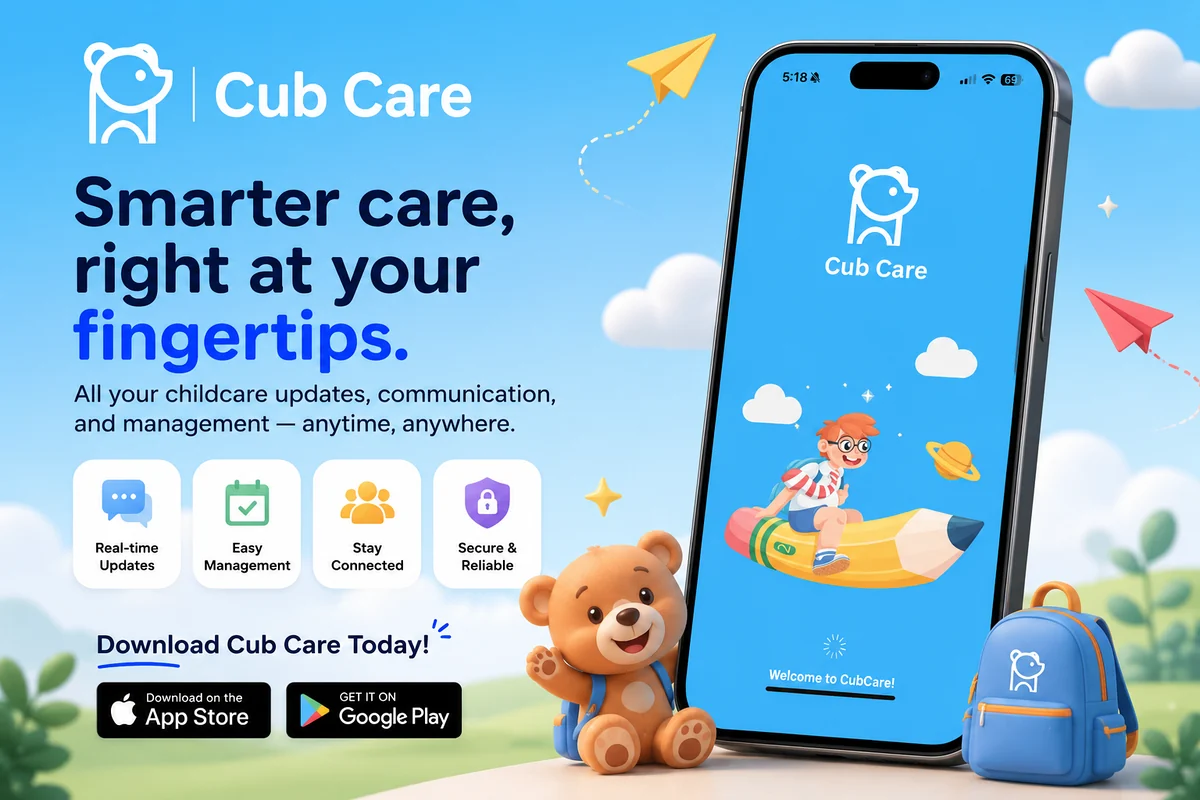
A staff app for educators and a family app for parents, each with the right tools for the job.
Check children in and out, record meals, naps and activities, and share updates in a few taps.
Families get daily reports, photos and private messages, only ever for their own child.
Personal logins and role based access keep your centre's information protected on every device.
Answers to the questions childcare centres ask us most. Cannot find what you need? Our team is glad to help.
Reach out and the CubCare team will get back to you, or book a demo to see the platform in action.
This Privacy Policy explains how CubCare Corp. handles personal information collected through our public website at www.cubcare.ca.
Effective date: July 30, 2026 · Last updated: July 30, 2026 · Version 1.0
CubCare Corp. (“CubCare,” “we,” “us,” or “our”) is a company based in British Columbia, Canada. We build and provide CubCare, childcare-management software licensed to childcare centres.
This Privacy Policy explains how CubCare Corp. handles personal information collected through our public website at www.cubcare.ca (the “Website”).
Privacy Officer: Privacy Officer, CubCare Corp. Privacy enquiries: contact@cubcare.ca. General enquiries: contact@cubcare.ca.
We handle personal information in accordance with British Columbia’s Personal Information Protection Act (PIPA). Depending on where you are located and the circumstances of collection, the federal Personal Information Protection and Electronic Documents Act (PIPEDA) or the privacy legislation of another Canadian province may also apply. Any marketing emails we send are governed by Canada’s Anti-Spam Legislation (CASL).
This policy applies to:
2.1 Personal information you provide to us directly through the Website, including through our contact, demo, pricing, and support forms.
2.2 Technical information collected automatically when you visit the Website.
2.3 Personal information we collect and use to manage our direct business relationship with a childcare centre or a prospective customer, such as the name and business email address of a centre administrator we correspond with about an account.
3.1 Information stored inside a childcare centre’s CubCare account. That information is controlled by the childcare centre. CubCare Corp. does not have access to it. Section 17 explains this in full.
3.2 Paid CubCare software services. Use of the CubCare platform under a subscription is governed by the written agreement between CubCare Corp. and the childcare centre, not by this policy.
3.3 Third-party websites. Sites we link to have their own policies. See section 19.
We collect only what we need in order to answer your enquiry, communicate with you about CubCare, operate and secure the Website, and manage our business relationship with childcare centres. We do not collect personal information beyond what a reasonable person would consider appropriate in these circumstances.
The Website is intended for businesses. It is designed for adults acting on behalf of childcare centres, childcare organisations, and other business or professional visitors. It is not directed at children, and we do not knowingly collect personal information from children through it.
You cannot create an account on the Website, and no payment can be made through it.
We collect information when you choose to give it to us. Depending on the form you use, this may include:
5.1 Contact form. Your name, business email address, business telephone number, the name of your childcare centre or organisation, your job title, your province or general location, and the content of your message. Purpose: to identify you, understand your enquiry, respond to it, and keep a record of the exchange.
5.2 Book a Demo form. The same categories as above, together with any details you provide about your centre, such as the number of locations or your general operational needs, and your scheduling preferences. Purpose: to assess whether CubCare suits your needs, arrange and deliver a demonstration, and follow up about it.
5.3 Request Pricing form. The same categories as above, together with any information you volunteer about the size or structure of your organisation. Purpose: to prepare and send pricing information relevant to your circumstances and to respond to your questions.
5.4 Support form. Your name, business email address, the name of your childcare centre, and the description of the issue you provide. Purpose: to identify your account relationship, diagnose and resolve the issue, and improve our support.
5.5 Business correspondence. If you email us or otherwise contact us outside a Website form, we collect the information contained in that correspondence.
Do not submit information about children, health or medical details, allergy or medication information, incident or behaviour records, family or guardian details, employee records, or any other sensitive childcare information through any form or email address on the Website. Our forms are not built to receive that kind of information. If you send it to us anyway, we will delete it as soon as reasonably practicable and, where appropriate, ask you to raise the matter directly with the relevant childcare centre.
When you visit the Website, limited technical information is collected automatically by the infrastructure that delivers the Website. This may include:
Purpose: to serve the Website, keep it secure and available, diagnose technical problems, and prevent abuse.
6.1 Analytics. We do not currently use website analytics tools on the Website. If we introduce analytics in future, we will update this policy and our Cookie Notice, and any analytics technology will be treated as non-essential and used only in accordance with your cookie choices.
6.2 Advertising technologies. We do not currently use advertising, retargeting, or cross-site tracking technologies on the Website. We are considering introducing advertising technologies in future. If we do, we will first put a cookie consent tool in place, update this policy and our Cookie Notice to identify each technology, and set such technologies only where you have given consent.
Further detail about cookies and similar technologies is set out in the CubCare Cookie Notice, which forms part of this policy.
7.1 How we obtain consent. In most cases you give us your personal information voluntarily and knowingly by completing a form or contacting us, having been told through this policy and the notice on the form what we will use it for. Where the sensitivity of the information or the nature of the purpose requires it, we ask for your express consent.
7.2 Consent is not bundled. We do not require you to agree to receive marketing communications in order to contact us, request a demonstration, ask about pricing, or obtain support.
7.3 Where consent is not required. In limited circumstances PIPA permits collection, use, or disclosure without consent, for example where necessary to respond to an emergency threatening life, health, or security, where required or authorised by law, or in the course of investigating a breach of an agreement or a contravention of law. We rely on these exceptions only where they genuinely apply.
7.4 Withdrawing consent. You may withdraw your consent at any time, subject to legal or contractual restrictions and reasonable notice. To withdraw consent, contact our Privacy Officer at contact@cubcare.ca. We will tell you what withdrawal means in practice, for example if we can no longer respond to an outstanding enquiry. Withdrawal does not affect anything we did lawfully before you withdrew.
8.1 CubCare Corp. does not currently operate a newsletter or send marketing emails, and the Website does not offer a newsletter sign-up.
8.2 If we introduce marketing communications in future, we will send commercial electronic messages only to people who have given us express consent through a clear, separate, and unchecked opt-in. We will not rely on implied consent.
8.3 Every commercial electronic message we send will identify CubCare Corp., provide the contact and mailing information CASL requires, and contain a working unsubscribe mechanism that costs you nothing and can be used easily. We will give effect to unsubscribe requests within 10 business days.
8.4 Transactional and relationship messages. Messages that are not commercial in nature, such as a reply to your support enquiry, a demo confirmation, a requested quotation, a service notice, or a billing communication to a customer, are not marketing messages. These are responses to a request you have made.
We use the personal information described in this policy to:
If we ever wish to use your personal information for a purpose materially different from those listed above, we will identify the new purpose and obtain your consent, unless the law permits otherwise.
We do not sell your personal information. We do not rent or trade it. We do not use information collected through the Website to build advertising profiles about identified individuals, and we do not use it to train or fine-tune artificial-intelligence or machine-learning systems.
We use a small number of carefully selected service providers to operate, secure, maintain, and support the Website and to deliver messages you send us. They are given access only to the personal information they need in order to perform their function, may use it only for that purpose, and are required to protect it and to handle it in a manner consistent with this policy.
The functions performed by our service providers are:
10.1 Website hosting and delivery. Hosting, storage, delivery, and security of the Website.
10.2 Form processing and temporary storage. When you submit a form, your submission is recorded in a database service so that it can be processed and delivered to us reliably. Submissions are held there only briefly. See section 14 for our retention practice.
10.3 Message delivery. An email delivery service transmits your form submission to our inbox at contact@cubcare.ca.
10.4 Website development and maintenance. Our website developers retain access to the Website in order to maintain it, correct faults, and make improvements. They are required to keep any information they encounter confidential and to use it only for the purpose of maintaining the Website.
10.5 Security and spam prevention. Our forms use built-in spam-prevention measures that run entirely within the Website. They do not involve a third-party service, do not set cookies, and do not collect or transmit any additional information about you. If we later introduce a third-party spam-prevention service that collects technical information, we will update this policy and our Cookie Notice before it is introduced.
We do not name our individual service providers in this policy, because they may change over time and an outdated list would be less accurate than a clear description of function. If you would like to know which providers currently handle information you have given us, contact our Privacy Officer at contact@cubcare.ca and we will tell you.
Our email inbox at contact@cubcare.ca is managed by CubCare Corp. in Canada.
The database service that briefly holds form submissions is configured to a Canadian region.
Some of our service providers are organisations with operations, corporate infrastructure, or support teams outside British Columbia and outside Canada, even where the data itself is held in a Canadian region. Where personal information is accessible from another jurisdiction, it may be subject to the laws of that jurisdiction, including lawful access by courts, law enforcement, and government authorities there. We select providers with appropriate safeguards and require them to protect the information they handle for us, but we cannot exempt them from the law of the countries in which they operate.
If you would like to know where information you have provided is processed, contact our Privacy Officer.
We may disclose personal information without your consent where PIPA or other applicable law requires or permits it, including:
We disclose only what is required, and we assess each demand before responding.
If CubCare Corp. is involved in a merger, acquisition, financing, reorganisation, or a sale of all or part of its business or assets, personal information may be disclosed to the parties involved and their advisers. Where this happens, the information disclosed will be limited to what is necessary to allow the parties to evaluate or complete the transaction, the recipients will be bound by confidentiality obligations, and any information transferred on completion will continue to be used for the purposes for which it was collected. Where the law requires notice of such a transfer, we will provide it.
We keep personal information only as long as necessary to fulfil the purpose for which it was collected, or as required by law.
14.1 Form submissions in our database service. Submissions are held in our database service only long enough to be processed and delivered to us. The database is cleared on a regular monthly basis, so that enquiry data does not accumulate there.
14.2 Enquiries in our email inbox. The email record of your enquiry is retained in our inbox for up to 24 months from your last contact with us, after which it is deleted.
14.3 Technical and security information. Technical information generated in the course of delivering and securing the Website is retained only for as long as needed for those purposes.
14.4 Business relationship records. Records supporting our business relationship with a childcare centre, including billing records, are retained for the periods required by applicable accounting, tax, and limitation-period requirements.
14.5 Access-related retention. Where personal information has been used to make a decision that directly affects you, PIPA requires us to keep it for at least one year after the decision so that you have a reasonable opportunity to obtain access.
14.6 Secure deletion. When information reaches the end of its retention period, we delete it or irreversibly anonymise it.
We maintain physical, organisational, and technological safeguards appropriate to the sensitivity of the personal information we hold. These include limiting access to those who need it in order to do their work, using reputable service providers, protecting information in transit to our systems, and clearing our form database on a regular basis so that we hold no more information than we need.
No method of transmission or storage is completely secure, and we do not guarantee that our safeguards will prevent every unauthorised access. What we commit to is maintaining reasonable protections, reviewing them, and responding promptly when something goes wrong.
If a privacy breach occurs involving personal information under our control, we will investigate it, take steps to contain and mitigate it, and notify affected individuals and the appropriate regulator where required by law or where we determine that notification is appropriate in the circumstances.
Please do not send sensitive information to us by unencrypted email.
16.1 Access. You may ask us for access to the personal information we hold about you, how we have used it, and to whom we have disclosed it. Send your request in writing to our Privacy Officer at contact@cubcare.ca. We will respond within 30 days, or tell you if we need an extension permitted by law and why.
We may need to verify your identity before releasing information. In limited circumstances PIPA allows or requires us to refuse access, for example where releasing the information would reveal personal information about another individual, where it is protected by solicitor-client privilege, or where it was collected for an investigation. If we refuse, we will tell you in writing, give our reasons, and explain how you may seek a review.
16.2 Correction. If you believe information we hold about you is inaccurate or incomplete, tell us and we will correct it where we are satisfied the request is reasonable. Where we have disclosed the information to others within the previous year, we will send them the correction. If we decide not to make a correction, we will note your request in our records.
16.3 Cost. We do not charge for correction requests or for routine access requests. Where a request requires significant effort, we may give you a written estimate of a minimal fee in advance, as permitted by PIPA, and you may withdraw or narrow the request.
16.4 Information held by a childcare centre. If your request concerns information stored inside a childcare centre’s CubCare account, we cannot help, because we do not have access to it. Please contact the childcare centre directly. See section 17.
This section explains an important boundary. Please read it carefully if you are a parent, guardian, employee, or other individual whose information may be held by a childcare centre.
17.1 Childcare centres control their own account information. Each childcare centre that licenses CubCare decides what information to enter, upload, or maintain in its account, how to use it, who inside the centre may see it, how long to keep it, and when to delete it. This includes records relating to children, parents, guardians, employees, attendance, enrolment, incidents, behaviour, health, allergies, medication, emergency contacts, billing, payroll, photographs, videos, documents, internal communications, and daycare operations (“Account Information”).
17.2 CubCare Corp. does not have access to Account Information. We do not view it, retrieve it, use it, sell it, or independently process it.
17.3 We do not use Account Information for our own purposes. Account Information, including child, parent, guardian, employee, health, attendance, incident, billing, and operational records, is not used by CubCare Corp. for advertising, marketing, profiling, analytics, the training of artificial-intelligence or machine-learning models, or any other unrelated commercial purpose.
17.4 We do not sell Account Information.
17.5 Direct your questions to the childcare centre. If you want to know what information a childcare centre holds about you or your child, ask for a copy of it, ask for it to be corrected or deleted, withdraw a consent you gave the centre, or complain about how the centre handles it, you must contact that childcare centre. The centre is the organisation responsible for those records. We cannot answer such requests on a centre’s behalf, and we cannot access the records in order to do so.
17.6 What this policy governs. This Privacy Policy governs CubCare Corp.’s public Website and our direct business relationship with childcare centres, for example the contact details of a centre administrator we deal with, and the billing and support records relating to the centre’s account with us. It does not govern a childcare centre’s own handling of information inside its account. That is a matter between the centre and the individuals concerned, and is subject to the centre’s own privacy policy and legal obligations.
17.7 Our contractual commitments. The terms on which CubCare Corp. provides its software to a childcare centre, including the arrangements that keep account contents under the centre’s control, are set out in the written agreement between CubCare Corp. and that centre. Those terms are not part of this policy.
The Website is a business website. It is intended for adults acting on behalf of childcare centres and other organisations, and for other professional visitors. It is not directed at children, and we do not knowingly collect personal information from children through it.
We do not invite anyone to enter children’s information into the Website. Our forms must not be used to submit information about children, their health, allergies, medication, incidents, behaviour, families, or any other sensitive childcare record. See sections 5 and 17.
If you believe a child has provided personal information through the Website, contact our Privacy Officer at contact@cubcare.ca and we will take steps to delete it.
The Website may link to sites we do not operate, for example industry resources, social-media profiles, or partner sites. We provide those links for convenience. We do not control those sites, and this policy does not apply to them. Review the privacy policy of any site you visit before providing personal information.
Our Privacy Officer is accountable for CubCare Corp.’s compliance with this policy.
Privacy Officer, CubCare Corp. Email: contact@cubcare.ca
If you have a question or a concern about how we handle your personal information, contact the Privacy Officer first. We will acknowledge your concern, investigate it, and respond in writing. If we find a complaint justified, we will take appropriate steps, including amending our practices where necessary.
If you are not satisfied with our response, you may contact:
Office of the Information and Privacy Commissioner for British Columbia, PO Box 9038, Stn. Prov. Govt., Victoria, BC V8W 9A4. Telephone: 250 387 5629. Toll-free in BC: 1 800 663 7867. Website: www.oipc.bc.ca
Depending on your location, you may instead have recourse to the Office of the Privacy Commissioner of Canada or to a provincial commissioner in another province.
We may update this policy to reflect changes in our practices, our technology, or the law. When we do, we will change the “Last updated” date at the top and increase the version number. If a change is significant, we will bring it to your attention through a notice on the Website. Material changes affecting how we use personal information already collected will not be applied without a fresh consent where consent is required.
Continued use of the Website after an update means you are subject to the current version. We encourage you to check this page from time to time.
CubCare Corp. Privacy Officer, CubCare Corp. Email: contact@cubcare.ca. Website: www.cubcare.ca
These Terms of Use govern your access to and use of the public website operated by CubCare Corp. at www.cubcare.ca. By accessing or using the Website, you agree to these Terms.
Effective date: July 30, 2026 · Last updated: July 30, 2026 · Version 1.0
1.1 These Terms of Use (the “Terms”) govern your access to and use of the public website operated by CubCare Corp. at www.cubcare.ca (the “Website”).
1.2 By accessing or using the Website, you agree to these Terms. If you do not agree, please do not use the Website.
1.3 In these Terms, “CubCare,” “we,” “us,” and “our” mean CubCare Corp., a company based in British Columbia, Canada. “You” and “your” mean the person accessing the Website and, where that person is acting for an organisation, that organisation as well.
2.1 The Website is intended for adults and for individuals acting on behalf of childcare centres, childcare organisations, and other businesses.
2.2 You must be of the age of majority in your jurisdiction to use the Website. It is not intended for children, and we do not invite children to use it.
2.3 If you use the Website on behalf of an organisation, you confirm that you have authority to bind that organisation to these Terms.
3.1 The Website exists to describe CubCare Corp. and the CubCare childcare-management software, to share information about our company and industry, and to allow interested organisations to contact us, request information, request pricing, arrange a demonstration, or request support.
3.2 The Website is a marketing and informational resource. It is not the CubCare software platform.
4.1 Content on the Website, including product descriptions, feature summaries, articles, guides, and any regulatory or operational commentary, is provided for general information only.
4.2 Nothing on the Website is legal, regulatory, financial, licensing, or professional advice, and nothing on it should be relied on as a statement of your obligations as a childcare operator. Childcare licensing and privacy requirements vary by jurisdiction and change over time. Obtain your own professional advice.
4.3 Nothing on the Website is a binding offer capable of acceptance, a guarantee of any particular result, or a commitment that any described feature will be available in a given plan, release, or region.
5.1 Visiting the Website, browsing it, submitting a form, requesting a demonstration, or requesting pricing does not create a subscription to CubCare services, a licence to use the CubCare software, or any contractual right to receive services.
5.2 Any pricing shown on or supplied through the Website is indicative unless it is set out in a written quotation or agreement signed or otherwise formally accepted by CubCare Corp.
5.3 You cannot create an account through the Website, and no payment can be made through it.
6.1 Access to and use of the CubCare software platform by a childcare centre is governed exclusively by a separate written agreement between CubCare Corp. and that centre (the “Customer Agreement”), together with any order form or documentation it incorporates.
6.2 These Terms govern the Website only. They do not amend, supplement, or interpret the Customer Agreement. If there is any inconsistency between these Terms and a Customer Agreement in relation to the CubCare platform, the Customer Agreement prevails.
6.3 Nothing in these Terms grants any right to access, use, or evaluate the CubCare platform.
7.1 Subject to these Terms, we grant you a limited, revocable, non-exclusive, non-transferable, non-sublicensable permission to access and view the Website for your own lawful, internal, informational, and evaluation purposes.
7.2 You may print or download individual pages for your own internal reference, provided you do not remove any copyright, trademark, or other proprietary notice.
7.3 All rights not expressly granted are reserved.
You must not, and must not attempt to, do any of the following:
8.1 Unauthorised access. Access or try to access any part of the Website, any server, or any system or network connected to it, that is not intentionally made available to you; or probe, scan, or test the vulnerability of any system or network.
8.2 Scraping. Copy, harvest, or collect content, data, contact details, or materials from the Website by any systematic or bulk method.
8.3 Automated extraction. Use any robot, spider, crawler, scraper, script, or other automated means to access, index, or extract from the Website, except that a general-purpose search engine may index publicly available pages in accordance with our robots directives.
8.4 Malware. Transmit or introduce any virus, worm, trojan horse, ransomware, logic bomb, or other malicious or harmful code or material.
8.5 Interference. Interfere with or disrupt the Website or its infrastructure, including by overloading, flooding, denial-of-service activity, or circumventing any security, rate-limiting, or access-control measure.
8.6 Impersonation. Impersonate any person or organisation, or misrepresent your identity, affiliation, or authority.
8.7 Fraudulent inquiries. Submit false, misleading, or fraudulent enquiries, or submit information about another person without their knowledge and authority.
8.8 Unlawful submissions. Submit or transmit anything unlawful, defamatory, harassing, threatening, obscene, discriminatory, or infringing of any third party’s rights.
8.9 Submission of children’s information or sensitive childcare records. Submit through any form or email address on the Website any information about children, health or medical information, allergy or medication information, incident or behaviour records, family or guardian details, employee records, payroll information, or any other sensitive childcare record. Our forms are not designed or intended to receive this information. If you send it to us, we will delete it as soon as reasonably practicable, and we may decline to act on your submission.
8.10 Misuse of communications channels. Use any Website form or contact address to send spam, chain communications, solicitations, or bulk marketing.
8.11 Reverse engineering. Decompile, reverse engineer, or disassemble any software used to provide the Website, except to the extent that restriction is prohibited by law.
8.12 Framing and misattribution. Frame, mirror, or present the Website in a way that misrepresents its source, or use our name or marks in metadata, keywords, or advertising in a way likely to cause confusion.
9.1 The Website as a whole. The Website and all material on it are owned by CubCare Corp. or licensed to us, and are protected by copyright, trademark, and other laws of Canada and other countries.
9.2 Original text. All original written content on the Website, including page copy, product descriptions, articles, guides, and documentation, is owned by CubCare Corp. or used under licence.
9.3 Original graphics. All original images, illustrations, icons, diagrams, photographs, and video created by or for CubCare Corp. are owned by CubCare Corp. or used under licence.
9.4 Logos and marks. The CubCare name, the CubCare logo, and CubCare’s associated branding are trademarks of CubCare Corp.
9.5 Interfaces. The layout, structure, navigation, look and feel, visual design, and user interface elements of the Website are owned by CubCare Corp. or licensed to us.
9.6 Website software. The software, code, scripts, and technical components used to operate the Website are owned by CubCare Corp. or its licensors.
9.7 Third-party materials. Some content on the Website may be owned by third parties and used under licence. Their rights are reserved to them, and their marks belong to their respective owners.
CubCare and its associated branding are trademarks of CubCare Corp. You may not use them without our prior written permission, except to refer accurately to CubCare Corp. or its products in a way that does not suggest endorsement, sponsorship, or affiliation. All other trademarks appearing on the Website belong to their respective owners.
11.1 Except as expressly permitted in section 7, you may not copy, reproduce, republish, upload, post, transmit, distribute, publicly display, perform, modify, adapt, translate, or create derivative works from any part of the Website.
11.2 You may not use any part of the Website for a commercial purpose without our prior written consent. This includes reselling, licensing, incorporating our content into a product or service, or using our content to train, fine-tune, or evaluate any artificial-intelligence or machine-learning system.
11.3 You may not use our content in a way that is misleading, that misattributes its source, or that removes or alters any attribution or proprietary notice.
12.1 Ordinary submissions. Information you submit through a contact, demo, pricing, or support form remains yours. Submitting it does not transfer ownership of it to CubCare Corp. We handle it in accordance with the CubCare Website Privacy Policy and use it for the purposes described there and on the form.
12.2 Your responsibility. You confirm that information you submit is accurate to the best of your knowledge, that you are entitled to provide it, and that it does not infringe anyone’s rights or breach any law or duty of confidentiality.
12.3 No confidentiality by default. Do not send us confidential or proprietary material through a Website form. Unless we have signed a written confidentiality agreement with you, we cannot treat unsolicited submissions as confidential.
12.4 No public posting. The Website does not allow visitors to post public content, comments, or other material.
12.5 Removal. We may remove, refuse, or delete any submission, and may decline to respond to it, at our discretion.
13.1 If you send us feedback, suggestions, ideas, or proposals about CubCare, our products, or the Website (“Feedback”), you grant CubCare Corp. a perpetual, irrevocable, worldwide, royalty-free, non-exclusive, sublicensable licence to use, reproduce, modify, and incorporate that Feedback for any purpose, without obligation, attribution, or compensation to you.
13.2 This section applies only to Feedback. It does not apply to your ordinary contact-form information, which is governed by section 12 and by the Privacy Policy.
13.3 Please do not send us Feedback that includes anyone’s personal information or any confidential material belonging to you or a third party.
Your use of the Website is also governed by the CubCare Website Privacy Policy and the CubCare Cookie Notice, each of which is incorporated into these Terms by reference. Please read them.
15.1 When you use the Website or send us electronic communications, you are communicating with us electronically and consent to receive communications from us electronically in connection with your use of the Website and any enquiry you make.
15.2 You agree that electronic records, notices, agreements, and disclosures satisfy any legal requirement that such communications be in writing, in accordance with British Columbia’s Electronic Transactions Act.
15.3 This section does not authorise us to send you marketing messages. Marketing is governed by your consent choices and by Canada’s Anti-Spam Legislation, as described in the Privacy Policy.
16.1 The Website may contain links to third-party websites and services that we do not control.
16.2 We provide those links for convenience and information. We do not endorse and are not responsible for the content, accuracy, products, services, security, or privacy practices of any third party.
16.3 Your dealings with any third party are solely between you and that third party. Their terms and privacy policies apply, and you should review them.
17.1 We aim to keep the Website accurate and current, but we do not warrant that it is. Content may contain errors, omissions, or information that has become out of date.
17.2 We may correct, change, or remove content at any time without notice, and we are not obliged to update any part of the Website.
17.3 Where a statement on the Website conflicts with a signed Customer Agreement or a formal written quotation, the signed document governs.
18.1 We do not promise that the Website will be available without interruption or error. Access may be suspended or restricted for maintenance, upgrades, security, or reasons beyond our control.
18.2 We may modify, suspend, restrict, or discontinue the Website or any part of it at any time, without notice and without liability to you.
19.1 The Website and its content are provided on an “as is” and “as available” basis.
19.2 To the fullest extent permitted by law, we disclaim all representations, warranties, conditions, and guarantees of any kind, whether express, implied, statutory, or otherwise, including any implied warranties or conditions of merchantability, merchantable quality, fitness for a particular purpose, durability, title, non-infringement, accuracy, or uninterrupted or error-free operation.
19.3 We do not warrant that the Website is free of viruses or other harmful components, or that defects will be corrected.
19.4 Some jurisdictions do not allow the exclusion of certain warranties or conditions. Where an exclusion is not permitted, it does not apply to you, and nothing in these Terms limits any right you have that cannot be excluded or limited by law.
20.1 To the fullest extent permitted by law, CubCare Corp. and its directors, officers, employees, contractors, and suppliers will not be liable for any indirect, incidental, special, consequential, exemplary, or punitive damages, or for any loss of profits, revenue, business, goodwill, data, or anticipated savings, arising out of or in connection with your use of, or inability to use, the Website, whether the claim is in contract, tort (including negligence), statute, or otherwise, and even if we were advised of the possibility.
20.2 To the fullest extent permitted by law, our total aggregate liability arising out of or relating to the Website and these Terms will not exceed one hundred Canadian dollars (CAD $100). This reflects the fact that the Website is provided free of charge and for information only.
20.3 This section does not limit liability for fraud, fraudulent misrepresentation, or any other liability that cannot be limited or excluded under British Columbia law.
20.4 This section does not apply to liability arising under a Customer Agreement, which contains its own liability provisions.
To the extent permitted by law, you agree to indemnify and hold harmless CubCare Corp. and its directors, officers, and employees from and against any claims, liabilities, losses, damages, and reasonable legal costs arising from your breach of these Terms, your misuse of the Website, your unlawful submissions, or your infringement of the rights of any third party. We will notify you of any claim to which this section applies and may participate in its defence at our own expense.
We may restrict, suspend, or block your access to the Website, in whole or in part and without notice, if we reasonably believe you have breached these Terms, if your activity threatens the security, integrity, or availability of the Website, or if we are required to do so by law.
These Terms and any dispute arising out of or in connection with them or the Website are governed by the laws of the Province of British Columbia and the federal laws of Canada applicable in it, without regard to conflict-of-laws rules.
24.1 Talk to us first. If you have a concern, please contact us at contact@cubcare.ca. Most issues can be resolved informally, and we ask that you give us a reasonable opportunity to do so.
24.2 Courts. Subject to clause 24.1, you and CubCare Corp. submit to the exclusive jurisdiction of the courts of the Province of British Columbia and agree that British Columbia is the appropriate forum.
24.3 Consumer rights preserved. If you are a consumer, nothing in this section deprives you of the protection of mandatory provisions of the law of your place of residence, or of any right you have to bring proceedings in your local courts where the law gives you that right.
If any provision of these Terms is found unenforceable, it will be modified to the minimum extent necessary to make it enforceable, or severed if modification is not possible. The remaining provisions continue in full force.
Our failure or delay in enforcing any provision of these Terms is not a waiver of it. A waiver is effective only if given in writing by us, and applies only to the specific instance identified.
You may not assign or transfer these Terms or any rights under them without our prior written consent. We may assign or transfer these Terms in whole or in part, including in connection with a merger, acquisition, reorganisation, or sale of all or part of our business.
These Terms, together with the Privacy Policy and the Cookie Notice, constitute the entire agreement between you and CubCare Corp. in relation to the Website, and supersede all prior understandings about it. This clause does not affect any Customer Agreement, which governs the CubCare platform separately.
29.1 We may revise these Terms from time to time. The current version will always be posted on the Website with an updated “Last updated” date and version number.
29.2 Changes take effect when posted. Your continued use of the Website after that date means you accept the revised Terms. If you do not accept them, stop using the Website.
29.3 We will use reasonable efforts to draw attention to material changes through a notice on the Website.
CubCare Corp. Email: contact@cubcare.ca. Website: www.cubcare.ca
These Administrator Terms apply to owners, directors and administrators who manage a CubCare account on behalf of a centre. They sit alongside our Terms and Conditions and Privacy Policy.
Last updated: this is draft content prepared for review. The effective date will be confirmed before launch.
By acting as an administrator, you confirm that you are authorised to manage the centre's CubCare account and the information within it, and that you will act in accordance with your centre's policies and applicable law.
Administrators are responsible for inviting users, assigning roles and removing access promptly when a person leaves or changes responsibilities. You should grant each user only the access they need for their role.
CubCare provides role based access, including preset roles for managerial, teaching and HR staff that you can adjust. Administrators are responsible for configuring and maintaining permissions, including turning areas such as billing on or off for particular roles, so that users only see what is appropriate.
Administrators are responsible for the correct setup of shifts and kiosk access. Teaching staff access to children, rooms, curriculums and attendance depends on being signed in for an assigned shift. Administrators should manage kiosk authorisation carefully and review the sign in records the platform provides.
Administrators are responsible for obtaining any consents the centre needs from families and staff to collect, use and share information in CubCare, including consent for sharing photos, videos and activity updates with parents.
Administrators take reasonable care to keep centre information accurate, complete and up to date, and to correct information when notified that it is wrong.
Administrators configure billing details such as fees, subsidies, deposits and schedules, and confirm they are correct before invoices are issued. Administrators are responsible for the accuracy of payroll and paystub information they generate or upload.
Administrators manage the centre's subscription and any changes as the centre grows or its needs change.
Administrators handle children's and staff information responsibly, in line with their centre's policies, childcare licensing requirements and applicable privacy law, and ensure that access within the centre is appropriate.
Administrators are responsible for confirming licensing requirements, including staff to child ratios and record keeping, with their licensing officer and current regulation. CubCare tools and any ratio guidance are general information only and do not replace official requirements.
Administrators should make appropriate use of the platform's records, including attendance, incident reports and sign in logs, and follow their centre's procedures for retaining and producing records when required.
Administrators keep their own credentials secure, promptly remove access for departing users, and report suspected security or privacy concerns without delay.
If you have questions about this page, would like to exercise a privacy right, or wish to raise a concern, please reach the CubCare team through our contact page. Where a request relates to a specific centre's account, we may direct you to that centre, which controls the information held in its workspace.
These Staff Terms apply to educators, managers and other staff who use CubCare as part of their work at a centre. They are intended to protect the children, families and colleagues whose information you may access.
Last updated: this is draft content prepared for review. The effective date will be confirmed before launch.
You use CubCare only to carry out your role at the centre and in accordance with your centre's policies, your training and applicable law.
If you are a teaching staff member, your access to children, rooms, curriculums and attendance depends on being signed in for an assigned shift, using your personal sign in at the kiosk. When you are not signed in, you should expect to see only your own profile, shift details and leave requests. You must not attempt to gain access outside your assigned shift or role.
Information about children, families and colleagues is confidential. You access it only when you need it for your role, and you keep it confidential during and after your employment.
You handle children's and families' information with care and only for legitimate centre purposes. You do not take screenshots, photos or copies of records for personal use, and you do not share information outside approved centre workflows.
You communicate with families and colleagues professionally and respectfully through the platform, and you follow your centre's guidance on messaging and on sharing photos and videos.
You keep your login details and personal sign in credentials secure, you do not share them with others, and you do not use another person's credentials. You sign in only as yourself.
You follow your centre's policies when using CubCare, including policies on privacy, conduct, incident reporting and device use.
You promptly report to your centre any errors, suspected privacy concerns, lost devices or access issues, so they can be addressed.
When you use CubCare on a shared or personal device, you take reasonable care to protect access, lock your device and sign out when appropriate.
Misuse of the platform or of the information within it may lead to removal of access and to action by your centre in line with its policies and applicable law.
If you have questions about this page, would like to exercise a privacy right, or wish to raise a concern, please reach the CubCare team through our contact page. Where a request relates to a specific centre's account, we may direct you to that centre, which controls the information held in its workspace.
These Parent and Family Terms apply to parents and guardians who use the CubCare parent app to stay connected with their child's centre.
Last updated: this is draft content prepared for review. The effective date will be confirmed before launch.
You access the CubCare parent app through an invitation from your child's centre. Your access, and what you can see, is configured and controlled by the centre.
The parent app is for information about your own child. By design, you only ever see information relating to your own child, and not information about other children or families. You must not attempt to access information that is not yours.
You keep your login details secure, do not share your access with others except as your centre permits, and let the centre know if you think your account has been compromised.
You keep your contact and emergency information current so that the centre can reach you when needed, and you update details through the app or by contacting the centre.
Where online payments are available, you use them in line with your centre's billing terms. You can see your invoices and whether they are paid. Payment processing may be provided by a third party under its own terms.
You communicate respectfully with the centre and its staff through the app, and you follow the centre's guidance on messaging.
Photos, videos and updates shared with you may include only your own child. You must not share content from the app in a way that would identify or expose other children, and you respect the privacy of other families.
Records about your child are controlled by the centre. For questions about your child's records, corrections or access, please contact your centre first. The centre is responsible for the accuracy of the information it maintains.
Your use of the app and the centre's collection and use of your child's information are subject to the consents you provide to the centre. You may contact your centre to discuss or withdraw consent, subject to the centre's obligations and applicable law.
If you have questions about this page, would like to exercise a privacy right, or wish to raise a concern, please reach the CubCare team through our contact page. Where a request relates to a specific centre's account, we may direct you to that centre, which controls the information held in its workspace.
This notice explains how CubCare Corp. uses cookies and similar technologies on our public website at www.cubcare.ca, and how you can control them.
Effective date: July 30, 2026 · Last updated: July 30, 2026 · Version 1.0
This notice explains how CubCare Corp. (“CubCare,” “we,” “us”) uses cookies and similar technologies on our public website at www.cubcare.ca (the “Website”), and how you can control them.
It forms part of the CubCare Website Privacy Policy, which explains more broadly how we handle personal information.
This notice applies to the public Website only. It does not apply to the CubCare software platform used by childcare centres, and it does not apply to information stored inside a childcare centre’s CubCare account. CubCare Corp. does not have access to that information.
A cookie is a small text file that a website asks your browser to store on your device. When you return, the browser sends the file back, which lets the site recognise your device, remember your settings, or measure how the site is used.
Cookies are described as first-party when they are set by the website you are visiting, and third-party when they are set by another organisation whose content or service is used on that website.
Several other technologies do comparable things, and this notice treats them the same way as cookies:
Where this notice says “cookies,” it means cookies and these similar technologies.
We use these technologies to make the Website work and keep it secure, and to protect our forms from automated abuse.
We do not use cookies on the Website to build advertising profiles about identified individuals, and we do not use them to collect information about children.
We keep our use of cookies deliberately limited. As at the effective date of this notice:
If any of this changes, we will update this notice before the new technology is introduced, and we will obtain your consent where consent is required.
These enable core functions such as page delivery, security, keeping the Website available, and protecting our forms against automated abuse. Without them the Website cannot be provided.
Because they are essential, they are used on the basis that they are necessary to provide a service you have requested, rather than on the basis of consent. You can still block them through your browser, though parts of the Website will stop working.
We do not currently use functional or preference cookies on the Website.
We do not currently use analytics cookies on the Website.
If we introduce analytics in future, those cookies will be treated as optional and non-essential. We will put a cookie consent tool in place first, and analytics cookies will be set only where you have chosen to allow them. Analytics cookies will never be described or treated as essential.
We do not currently use advertising, retargeting, or cross-site tracking cookies on the Website.
We are considering introducing advertising technologies in future. If we do:
We do not currently embed third-party video, maps, chat, scheduling, or social-media content on the Website.
The spam-prevention measures on our forms run entirely within the Website. They do not involve a third-party service and do not set cookies. If we later introduce a measure that involves a third-party service setting cookies or collecting technical information, we will update this notice to describe it before it is introduced.
Session cookies last only for your current browsing session and are deleted when you close your browser.
Persistent cookies remain on your device for a set period, or until you delete them, so that the site can recognise your device on a later visit.
The type and duration of each cookie currently in use is shown in the inventory at section 9. We review durations periodically and set them no longer than is necessary for the purpose.
8.1 Browser and device controls. Because we currently use only strictly necessary cookies, the Website does not display a cookie preference tool. You can control cookies through your browser at any time.
All major browsers let you view, block, and delete cookies, and most let you block third-party cookies specifically. The controls are usually found under privacy or security settings, and your browser’s help pages explain the steps. Your browser may also offer a private or incognito mode, which discards cookies at the end of the session.
Browser settings apply per browser and per device. If you use several, you will need to set each one.
8.2 If we introduce optional cookies. Before we introduce any analytics or advertising cookies, we will add a cookie consent tool to the Website. When that happens:
The table below lists the cookies and similar technologies currently in use on the Website.
We review this inventory periodically and after any significant change to the Website.
Blocking strictly necessary cookies through your browser may cause parts of the Website to fail. Forms may not submit, and security checks may not complete.
Because we do not currently use optional cookies, blocking non-essential cookies will have no effect on your experience of the Website.
Some browsers can send a “Do Not Track” or Global Privacy Control signal. There is no consistent industry or legal standard for how a website should respond to these signals, and the Website does not currently respond to them.
This has no practical effect at present, because we do not use tracking technologies. If we introduce optional cookies in future, we will provide a direct and reliable way to control them through a cookie consent tool, and we will update this section.
We will update this notice when our use of cookies changes. The “Last updated” date and version number at the top will change, and the inventory will show a revised verification date. Where a change introduces a new category of optional cookies, we will put a consent tool in place and ask for your consent before those cookies are set.
Questions about this notice or about cookies on the Website: CubCare Corp. Privacy Officer, CubCare Corp. Email: contact@cubcare.ca
Attendance, ratios, billing, parent messaging and compliance — finally in one calm place, built for Canadian early learning.